PHP runs behind a huge share of the web, from WordPress blogs and WooCommerce shops to Laravel SaaS products, school ERPs and the admin panels most Indian businesses log in to every day. This week, that common foundation needed an emergency repair. On 21 October 2026 the PHP project released fixes for a critical PHP vulnerability pair, CVE-2026-109618 and CVE-2026-109619, which researchers have nicknamed PHP2Shell.
The name says it all: in the worst case, an attacker sends specially crafted web requests and ends up with a shell, the ability to run their own commands on your server, without a password and sometimes before your application code even runs. Updating WordPress, Laravel or your plugins does not fix it. The fix lives in PHP itself, which means it is the job of whoever runs your server, hosting account or containers.
This guide explains the PHP vulnerability in plain language, who is affected, the exact PHP versions that contain the latest fix, how to check and update your PHP version, what to do if you cannot update today or are stuck on an old release, and a 7-day checklist you can hand to your developer or hosting provider.
At a Glance
- What: two critical flaws in the PHP engine, CVE-2026-109618 (out-of-memory corruption) and CVE-2026-109619 (stale global state, a use-after-free). Both are rated 9.2 on the CVSS v4.0 scale and can allow unauthenticated remote code execution.
- Who is at risk: every PHP installation serving web requests, including PHP-FPM, Apache with mod_php, php-cgi, FrankenPHP and LiteSpeed. PHP rates the risk highest for mod_php.
- The latest fix: PHP 8.5.12, 8.4.27, 8.3.36 and 8.2.35, released on 21 October 2026. Linux distributions and long-term support vendors received the patches in advance.
- Older versions: PHP 8.1 and older get no official release. PHP published minimal source backports for 7.4, 8.0 and 8.1; anything older needs an upgrade.
- Exploitation: security firms report exploitation attempts since 17 October, and public proof-of-concept code is circulating, though Rapid7 found none of it broadly reliable.
- What to do now: update PHP, restart every PHP worker, rebuild container images, and check old servers and staging sites you may have forgotten.
What Is the PHP2Shell PHP Vulnerability?
PHP2Shell is the name researchers gave to an exploit chain built on two bugs deep inside the PHP interpreter, the program that turns your PHP code into web pages. Because the bugs are in PHP itself rather than in a framework or plugin, they can affect almost any PHP application, regardless of how carefully that application was written.
CVE-2026-109618: remote code execution via out-of-memory corruption
In the words of the PHP security advisory, "out-of-memory handling can interrupt PHP while internal request data is only partially initialized. Request cleanup may then treat the invalid data as valid." An attacker can push PHP to its memory limit with a crafted request, for example a multipart form or file upload, so that PHP gives up halfway through setting up the request. The clean-up code then works with half-built data, which can be steered into running the attacker's code.
CVE-2026-109619: remote code execution via stale global state
The second bug is a use-after-free. PHP's advisory explains that "request-owned internal state can survive after its backing memory has been freed. A later request handled by the same worker may use that stale state before normal initialization resets it." Put simply, one request leaves a mess behind in a PHP worker, and the next request on the same worker trips over it. Researchers confirmed this path through PHP's session upload progress feature, which is switched on by default and does not need your code to call session_start().
How it was found and disclosed
- 1 August 2026: security firm Calif found the first issue, with OpenAI and Wiz also credited. Calif says it used AI language models as research aids. The bugs were reported to PHP on 11 and 21 August.
- 17 October: Amazon's threat intelligence team saw an exploitation attempt against its honeypots, four days before public disclosure, according to Tenable.
- 20 October: the CVE numbers leaked online, carrying an incorrect score of 10.0. PHP announced an emergency release for the next day.
- 21 October, 14:00 UTC: PHP released the fixed versions and its security advisory.
Calif reports that the earliest affected code path dates back to PHP 5.4.0, and that it demonstrated pre-authentication remote code execution against specific versions of popular PHP software, including WordPress, Drupal, Joomla, Magento, phpMyAdmin, Nextcloud, Laravel, Symfony and WHMCS. That list matters less as a hit list than as a reminder: if it runs on PHP, assume it is affected until the server is patched.
How the Attack Works, in Plain Language
Most PHP websites are served by a small pool of long-running worker processes. Each worker handles one request after another, cleaning up in between. PHP2Shell abuses that clean-up.
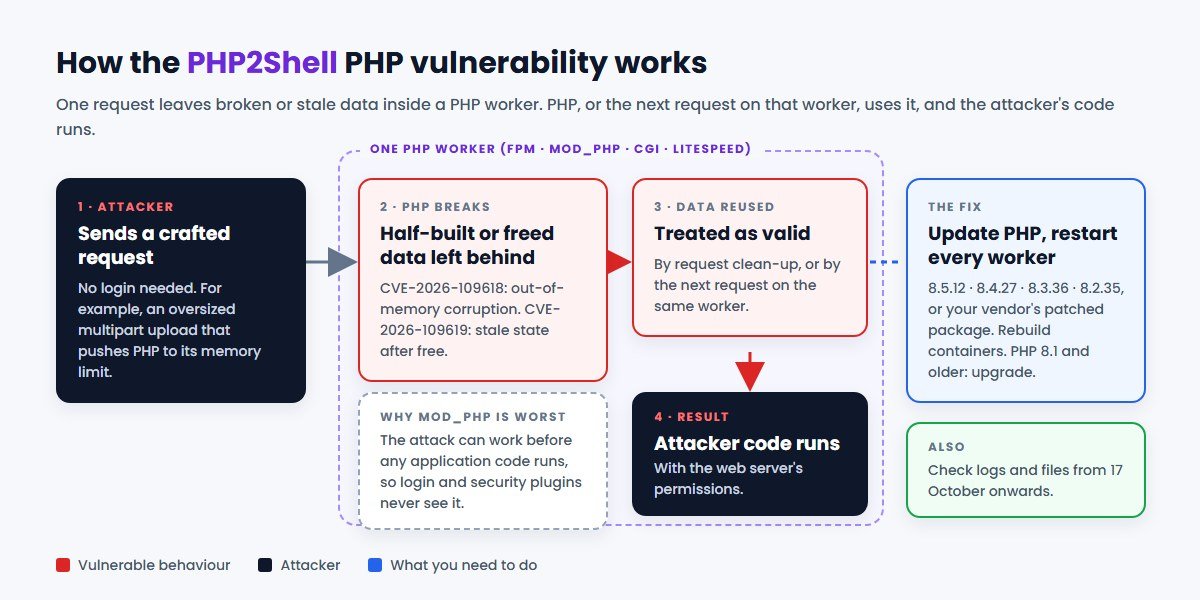
- The attacker sends a crafted request, such as an oversized multipart upload, that makes PHP run out of memory or hit a fatal error at exactly the wrong moment.
- PHP is left in a broken state: internal data is half-built (CVE-2026-109618) or points to memory that has already been freed (CVE-2026-109619).
- PHP, or the next request on the same worker, uses that broken data as if it were valid.
- With careful shaping, that turns into code execution with the permissions of the web server process. From there an attacker can read configuration files and database passwords, plant a web shell, steal customer data or use your server to attack others.
Why is mod_php the highest risk? PHP explains that with Apache's mod_php, "an unauthenticated request can trigger the attack before any application code runs." Your login pages, firewalls written in PHP and security plugins never get a chance to step in. PHP-FPM is harder to attack for the first bug but is still confirmed vulnerable to the session path of the second.
The good news is that exploitation is not trivial. Rapid7 reviewed the public proof-of-concept code and found that each works only for a specific combination of operating system, PHP version and web server, and that none "appears to be broadly reliable." That buys time, but not much: attackers improve exploits quickly once the details are public, and Rapid7 recommends patching "on an emergency basis, outside of normal patch cycles."
Who Is Affected by This PHP Vulnerability
You need to act if you run:
- A WordPress, WooCommerce, Drupal, Joomla or Magento site. WordPress.org has said no WordPress update is required or planned, which means the PHP update on your hosting is the fix.
- A custom PHP or Laravel application, such as a CRM, ERP, customer portal, booking system or SaaS product, on your own VPS, cloud server or container platform.
- Admin tools on PHP, such as phpMyAdmin, Roundcube webmail, Nextcloud or a billing system like WHMCS.
- Docker or Kubernetes images built on an official or custom PHP base image. A running container keeps its old PHP until you rebuild and redeploy it.
- Old servers, staging copies or forgotten microsites. These are often on the oldest PHP versions and the least watched.
You are probably lower risk if:
- Your managed host has confirmed in writing that it has applied the 21 October fixes. Several large hosts published status updates within a day.
- You use a platform where the provider manages PHP for you and has confirmed the update, for example Google's App Engine standard environment on PHP 8.2 or newer, which Google says was updated automatically.
- PHP only runs as a command-line tool on a machine that does not serve web requests. The advisory focuses on installations serving web traffic, though it is still sensible to update.
A firewall such as Cloudflare helps. Cloudflare has deployed rules against known PHP2Shell attack patterns on all plans, including free, but those rules only cover traffic that passes through Cloudflare and only known patterns. Treat any web application firewall as a seatbelt, not a fix.
The Latest Fix: PHP Versions to Install
The PHP project has released one fixed version on each supported branch. If your server runs an earlier version on that branch, it is vulnerable.
| Your PHP branch | Install this version or later | Notes |
|---|---|---|
| PHP 8.5 | 8.5.12 | Also set fatal_error_backtraces=0 if you must delay the update |
| PHP 8.4 | 8.4.27 | Actively supported |
| PHP 8.3 | 8.3.36 | Security fixes only |
| PHP 8.2 | 8.2.35 | Reaches end of life on 31 December 2026; plan your upgrade |
| PHP 7.4, 8.0, 8.1 | No official release | Vendor backport, PHP's minimal source backport, or upgrade |
| PHP 7.3 and older | No fix | Upgrade to a supported version |
One catch: Linux distributions such as Ubuntu, Debian and Red Hat, and hosting platforms using CloudLinux, often backport security fixes without changing the version number. A server showing, say, PHP 8.3.6 from Ubuntu may be fully patched. In that case, check the package changelog or your vendor's security notice for CVE-2026-109618 rather than relying on the number alone.
How to Check and Update Your PHP Version
On shared or managed hosting
- Find your PHP version. In WordPress, go to Tools, Site Health, Info, then Server. In cPanel or Plesk, look for "Select PHP Version" or "PHP Settings".
- Ask your host a direct question: "Have you applied the 21 October 2026 PHP security fixes for CVE-2026-109618 and CVE-2026-109619 on my server?" Get the answer in writing.
- If you are on PHP 8.1 or older, switch to PHP 8.2 or newer in the control panel, but test on a staging copy first. Older themes and plugins can break.
- Take a full backup before any PHP version change, then check your key pages, forms and checkout afterwards.
On your own server (VPS, cloud or dedicated)
Your developer or system administrator can check the version from the command line:
php -v
# For the web server's PHP, check phpinfo() or the FPM binary, e.g.
php-fpm8.3 -v
The command-line PHP and the web PHP can be different versions, so check both. Then install the update from your distribution or PHP repository. On Ubuntu or Debian, for example:
sudo apt update
sudo apt install --only-upgrade 'php8.3*'
apt changelog php8.3-fpm | grep -i CVE-2026-109618
Restart every PHP worker
This step is easy to miss. Updating the package does not replace PHP code already loaded in memory. Restart PHP-FPM, Apache or LiteSpeed so that every worker runs the fixed version:
sudo systemctl restart php8.3-fpm
sudo systemctl restart apache2
Containers and cloud platforms
- Docker: pull the patched PHP base image, rebuild your application images, and redeploy. Pin to the fixed version, such as
php:8.3.36-fpm, rather than an old tag. - Kubernetes: roll out the rebuilt images so that every pod restarts on the patched PHP.
- Managed platforms: Google, for example, says Cloud Run updates automatically only if automatic base image updates are enabled; otherwise you must rebuild or redeploy. Check your provider's bulletin for its specific steps.
Can't Update Today? Interim Hardening
PHP is clear that "updating is the only safe choice" and that these measures "do not make an installation safe." They can reduce exposure for a few days while you schedule the update. Apply them in server configuration, not in application code, and restart every worker afterwards.
For CVE-2026-109618 (out-of-memory corruption)
- Set
memory_limit=-1in a way applications cannot override, for example withphp_admin_valuein the FPM pool or Apache configuration. This removes the attacker-controllable memory limit, so pair it with a container or cgroup memory limit to protect the server's availability. - Lower
post_max_size: PHP suggests 8M for applications that do not need uploads, or 32M if they do, withupload_max_filesizebelow it. - Enforce request size and multipart limits at the web server or proxy as well.
- Do not use
RLIMIT_ASorRLIMIT_DATAlimits; PHP warns they can trigger the vulnerable path.
For CVE-2026-109619 (stale global state)
- Set
session.upload_progress.enabled=0inphp.ini, the FPM pool or server configuration. PHP warns thatini_set()and FPM.user.inifiles apply too late. - On PHP 8.5, also set
fatal_error_backtraces=0. - Fix fatal errors and timeouts that attackers can trigger, for example in upload and import code.
- Hiding errors with
display_errors,error_reportingor the@operator does not help.
If a site cannot be patched or hardened quickly, take it off the public internet or put it behind a VPN or IP allow-list until it can. CISA goes further for unsupported versions, recommending that PHP systems on 8.1 or earlier that cannot be updated be taken offline.
Stuck on PHP 8.1 or Older?
This PHP vulnerability is a hard lesson about end-of-life software. PHP 8.1 and earlier no longer receive official updates. Because of the severity, the PHP security team published minimal source backports for PHP 7.4, 8.0 and 8.1, but these are meant for people who build PHP from source. For PHP 7.3 and older, there is no fix at all.
Your realistic options are:
- Get a vendor backport. Some Linux distributions, cPanel and long-term support vendors have shipped patched packages for older branches. This is the fastest route, but it only buys time.
- Upgrade to PHP 8.3 or 8.4. This is the lasting fix. Note that PHP 8.2 itself reaches end of life on 31 December 2026, so upgrading from 8.1 to 8.2 today only moves the problem by ten weeks.
- Isolate the application while the upgrade is in progress: restrict access, put it behind a firewall and monitor it closely.
Why do businesses get stuck? Usually because the application relies on old frameworks, abandoned plugins or code that breaks on newer PHP: an old CodeIgniter or Laravel 5 app, a custom WordPress theme from 2017, a vendor-built ERP with no source updates. Upgrading these is real work, involving dependency updates, fixing deprecated functions, and testing every important flow, but it is far cheaper than a breach. Our legacy application modernisation guide explains how to plan it, and if you are choosing a stack for a rebuild, see Laravel vs Node.js for web applications.
Have You Already Been Attacked? What to Look For
Exploitation attempts were seen from 17 October, so Tenable recommends starting any investigation from at least that date, not from the disclosure date. Patching closes the door; it does not remove anyone who may already have walked in. Ask your developer or host to check for:
- New or changed PHP files in upload folders, cache folders or the web root, especially files with random names.
- Unusual large multipart POST requests in web server logs, particularly bursts of them, and out-of-memory or fatal errors in PHP logs around the same time.
- Unexpected processes or outbound connections from the web server user, such as crypto-miners or reverse shells.
- New admin users in WordPress, your CMS or your application, and changes to scheduled tasks (cron).
A missing log entry does not prove you are safe: Rapid7 notes that suppressing diagnostics does not stop the stale-state path. If you find signs of compromise, isolate the server, preserve the logs, rotate database passwords, API keys and application secrets stored in your .env or config files, and rebuild from a clean source. If personal data may have been exposed, check your reporting obligations; our DPDP Act compliance checklist covers the basics for Indian businesses.
A 7-Day PHP Security Checklist
- Day 1, inventory: list every website, app, server, container image and hosting account that runs PHP, with its PHP version and who manages it. Include staging and old microsites.
- Day 2, patch the exposed ones: update internet-facing servers first, mod_php servers before anything else, then restart every worker.
- Day 3, confirm with hosts: get written confirmation from each hosting provider that the 21 October fixes are applied.
- Day 4, containers: rebuild and redeploy every PHP image, and update CI/CD pipelines to use the fixed base images.
- Day 5, investigate: review logs and file changes from 17 October onwards on every server that was exposed.
- Day 6, end-of-life plan: for anything on PHP 8.2 or older, agree an upgrade plan and timeline before 31 December 2026.
- Day 7, prevent the next scramble: subscribe to PHP and your distribution's security announcements, enable automatic security updates where safe, and agree who is responsible for patching each system.
This is the same discipline that helped businesses through the recent eMudhra certificate compromise: know what you run, keep it updated by default, and know who to call.
Conclusion
PHP2Shell is one of the most serious PHP vulnerability disclosures in years, because it sits in the PHP engine itself and can work before your application's own security gets a say. The fix, however, is straightforward: install PHP 8.5.12, 8.4.27, 8.3.36 or 8.2.35 (or your vendor's patched package), restart every PHP worker, rebuild your containers, and check for signs of compromise from 17 October onwards.
The bigger lesson is about what happens next time. Businesses that know where their PHP runs, keep it on supported versions and have someone responsible for updates patch in an afternoon. Businesses on PHP 7 or 8.1, with forgotten servers and no clear owner, face days of risk. If this PHP vulnerability has shown you gaps in your own setup, our free website audit is a good place to start.
Frequently Asked Questions
What is the PHP2Shell PHP vulnerability?
PHP2Shell is the nickname for two critical flaws in the PHP interpreter, CVE-2026-109618 and CVE-2026-109619, fixed on 21 October 2026. They involve memory corruption during out-of-memory handling and stale state left between requests, and both can allow an unauthenticated attacker to run code on a web server.
Which PHP versions fix CVE-2026-109618 and CVE-2026-109619?
PHP 8.5.12, 8.4.27, 8.3.36 and 8.2.35 contain the fixes. Linux distributions and hosting vendors may ship the same fixes under different version numbers, so check their security notices.
Do I need to update WordPress or Laravel?
No update to WordPress or Laravel fixes this PHP vulnerability. WordPress.org has said no WordPress update is required. The fix is updating PHP on the server and restarting it. Keep your CMS, framework and plugins updated anyway, as always.
How do I check my PHP version?
In WordPress, open Tools, Site Health, Info, Server. In cPanel or Plesk, open the PHP version settings. On a server, run php -v and also check the web server's PHP, since the command line and web versions can differ.
Is PHP 8.1 affected, and will it get a fix?
Yes, PHP 8.1 is affected and will not get an official release because it has reached end of life. PHP published a minimal source backport and some vendors ship patched packages, but the lasting fix is upgrading to PHP 8.3 or 8.4.
Is a web application firewall enough?
No. Firewalls from providers such as Cloudflare and Google Cloud Armor can block known attack patterns and are useful while you patch, but both providers say they are a temporary layer of protection. Updating PHP is the only complete fix.
How can CodeBase Coders help with the PHP2Shell PHP vulnerability?
CodeBase Coders can find every server, container and hosting account that runs PHP, update them to a fixed version, restart and verify every worker, and apply interim hardening where an update has to wait. If your application is stuck on PHP 8.1 or older, our PHP and Laravel developers can upgrade the code and test it so you can move to a supported version. Start with a free website audit, see our Laravel developers and DevOps services, or talk to our team.
Sources
- PHP.net (21 October 2026): Security advisory: Critical remote code execution vulnerabilities, update now
- PHP GitHub advisory GHSA-w8hw-w9fx-j79w (CVE-2026-109618)
- PHP GitHub advisory GHSA-6wmf-4rv5-p3rp (CVE-2026-109619)
- Calif: php2shell technical write-up
- Tenable: php2shell frequently asked questions
- Rapid7 (21 October 2026): Critical unauthenticated remote code execution in PHP
- watchTowr: PHP2Shell FAQ
- Google Cloud: Responding to core PHP vulnerabilities CVE-2026-109618 and CVE-2026-109619
- Codeable: PHP security release on 21 October 2026, what WordPress site owners need to do
- PHP.net: Supported versions
Work With CodeBase Coders
CodeBase Coders helps businesses turn ideas into scalable digital products and improve existing processes through software, automation, AI, integrations and modern web technologies. PHP and Laravel are a core part of what we build. After the PHP2Shell PHP vulnerability, we can patch and verify your servers and containers, harden PHP configuration, check for signs of compromise, and upgrade applications stuck on PHP 7 or 8.1 to a supported version.
- Free Website Audit
- Hire Laravel & PHP Developers
- Hire WordPress Developers
- DevOps Services
- Managed IT Services & Maintenance
- IT Audit Services
- Legacy Application Modernization
- Web Application Development
- E-commerce Development
Not sure which PHP version your website or app is running, or whether your host has patched it? Talk to CodeBase Coders and we will check your setup and help you fix anything that needs attention.
Rohan Verma
Founder, CodeBase CodersRohan Verma is the founder of CodeBase Coders. He helps startups, SMEs and enterprises turn ideas into scalable digital products and improve business processes through custom software, AI, automation, integrations and modern web technologies.