Every growing business reaches the point where people spend hours copying data between apps: leads from the website into the CRM, orders into the accounting tool, payment confirmations into WhatsApp, form replies into a spreadsheet. Workflow automation tools fix that without a full software project, and three names dominate the conversation in 2026. The n8n vs Zapier question, with Make as the third contender, is now one of the most common decisions small and mid-sized businesses face before they automate.
All three connect your apps and now offer AI agents, but they charge in very different ways, suit different teams, and treat your data differently. Pick the wrong one and you either outgrow it in six months or pay several times more than you need to. This guide compares n8n, Zapier and Make using their published October 2026 pricing, explains how each one counts usage, walks through a worked cost example, and ends with a ten-question checklist so you can choose with confidence.
At a Glance
| Zapier | Make | n8n | |
|---|---|---|---|
| Best for | Non-technical teams, quick wins | Visual, multi-step workflows on a budget | Technical teams, high volume, data control |
| Billing unit | Task (each successful action step) | Credit (most module actions) | Execution (one full workflow run) |
| Free option | 100 tasks a month | 1,000 credits a month | Self-hosted Community Edition |
| Entry paid plan | $19.99/month billed annually | $9/month billed annually | €20/month billed annually |
| Apps | 10,352+ | 3,500+ | 2,000+, plus any API via HTTP |
| Self-hosting | No | No | Yes |
| Learning curve | Lowest | Medium | Highest |
n8n vs Zapier vs Make: The Quick Answer
- Choose Zapier if non-technical staff will build the automations themselves, your workflows are simple, your volume is low to moderate, and you value the largest app library and the easiest setup over price.
- Choose Make if your workflows have several steps, branches and data transformations, you want a visual canvas, and you want to keep costs low as volume grows.
- Choose n8n if you have, or can hire, someone technical; you run many multi-step workflows; you want AI agents with full control; or you need to keep data on your own servers.
- Consider custom code when an automation becomes core to your product or business, handles sensitive data at scale, or needs logic no visual tool handles well.
What Each Tool Is, in Plain Language
Zapier
Zapier is the best-known automation tool. You build a "Zap": a trigger (for example, "new lead in Facebook Lead Ads") followed by one or more actions ("create a contact in the CRM", "send a WhatsApp message"). It is designed for people who have never written code, and it connects more apps than any rival. It also includes Tables, Forms, Chatbots and an AI assistant called Copilot that can build Zaps from a description.
Make
Make, formerly Integromat, builds "scenarios" on a visual canvas where you drag modules and connect them with lines. Routers, filters, iterators and aggregators make it easier to see and build complex logic than in a linear Zap. It sits between Zapier and n8n: more powerful than Zapier for complex flows, easier than n8n for non-developers.
n8n
n8n is a workflow automation platform with a node-based editor, popular with developers and technical teams. You can use n8n's cloud or install it on your own server, write JavaScript or Python inside workflows, call any API, and build AI agents with its AI nodes. That flexibility comes with a steeper learning curve, and self-hosting means someone has to look after the server.
How They Charge: Tasks, Credits and Executions
The biggest difference between n8n, Zapier and Make is not features, it is what they count. The same workflow can cost very different amounts on each platform.
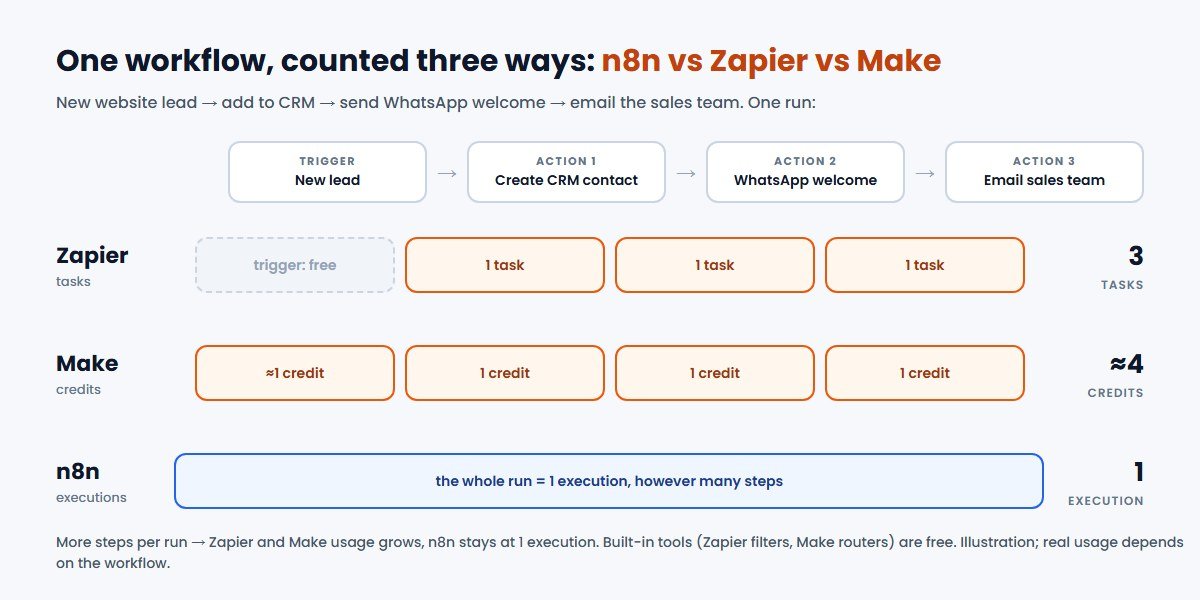
- Zapier counts tasks. A task is counted each time Zapier successfully completes an action step. The trigger does not count, and neither do built-in tools such as Formatter, Filter, Paths, Delay and Looping. AI steps and code steps can cost more than one task.
- Make counts credits. Most module actions cost one credit, including reading, creating, updating and transforming data. Routers and error-handler modules are free. Make says a scenario can use anywhere from two credits to thousands per run, depending on its design. Some AI features can cost more.
- n8n counts executions. In n8n's words, "an execution is a single run of your entire workflow." Ten steps or two hundred, one run is one execution. On the self-hosted Community Edition, executions are not billed at all.
The practical result: the more steps a workflow has, the more n8n's model saves you compared with Zapier's. For short, two-step automations the difference is small.
Pricing in 2026: Zapier vs Make vs n8n
All three charge in US dollars or euros, so the rupee cost moves with the exchange rate, and GST may apply on top. The prices below are the published October 2026 list prices.
Zapier pricing
| Plan | Billed annually | Billed monthly | Included |
|---|---|---|---|
| Free | $0 | $0 | 100 tasks a month, two-step Zaps, 15-minute checks |
| Professional | $19.99/month | $29.99/month | 750 tasks a month, multi-step Zaps, 2-minute checks |
| Professional, 2,000 tasks | $49.00/month | $73.50/month | Same features, more tasks |
| Team | $69.00/month | $103.50/month | 2,000 tasks a month, shared workspace, 1-minute checks |
| Enterprise | Custom pricing | Custom limits and controls | |
Zapier's paid plans scale up to 2,000,000 tasks a month. If you switch on pay-per-task, extra tasks cost more than tasks inside your plan, so it is worth sizing the plan to your real volume.
Make pricing
| Plan (10,000 credits a month) | Billed annually | Billed monthly |
|---|---|---|
| Free | $0, with 1,000 credits a month | |
| Core | $9/month | $10.59/month |
| Pro | $16/month | $18.82/month |
| Teams | $29/month | $34.12/month |
| Enterprise | Custom pricing | |
Prices rise as you add credits. Make's pricing page loads its figures dynamically; the numbers above match independent checks of that page made in October 2026, so confirm them on Make's site before you buy.
n8n pricing
| Plan | Price (billed annually) | Included |
|---|---|---|
| Community Edition | Free, self-hosted | Unlimited workflows; you pay for and manage the server |
| Starter (cloud) | €20/month | 2,500 executions a month, 5 concurrent, AI agents and AI nodes |
| Pro (cloud) | €50/month | 10,000 executions a month, more concurrency and AI credits |
| Business (self-hosted) | €667/month | 40,000 executions a month, team and governance features |
| Enterprise | Custom pricing | Hosted or self-hosted, custom limits |
n8n offers businesses with fewer than 20 employees 50% off the Business plan. The Community Edition is free to use for your own internal business purposes under n8n's Sustainable Use License, but servers, backups, security updates and someone's time are real costs. Budget for them.
A Worked Cost Example
Take a common Indian business automation: when a new lead arrives from your website form (the trigger), create the contact in your CRM, send a WhatsApp welcome message and notify the sales team on email. That is one trigger and three actions. Assume 600 leads a month.
- Zapier: three action steps × 600 runs = 1,800 tasks. That is more than the 750-task entry plan, so you need a higher Professional tier; the 2,000-task tier costs $49.00 a month billed annually.
- Make: roughly four credits per run (trigger plus three actions) × 600 = about 2,400 credits, comfortably inside Core's 10,000 credits for $9 a month billed annually.
- n8n: 600 executions, inside Starter's 2,500 for €20 a month billed annually, or free on a self-hosted Community Edition plus your server costs.
Now add five more steps, such as enriching the lead, scoring it with AI and logging it in a sheet. Zapier and Make usage roughly triples, while n8n still counts 600 executions. That is why high-volume, multi-step automation tends to favour n8n, and why simple, low-volume automation often does not justify n8n's extra setup effort. This is an illustration, not a quote: your real usage depends on how each workflow is built.
AI Agents in 2026: How the Three Compare
AI agents, automations that can decide which step to take next using a large language model, are the main reason businesses are revisiting these tools in 2026. All three now support them, in different ways.
- Zapier includes basic access to Zapier Agents on every plan, with premium add-ons available, and offers AI steps inside Zaps plus Copilot to help build them. It is the easiest way for a non-technical team to try an AI agent connected to everyday apps.
- Make offers AI agents and AI modules that sit inside visual scenarios, which makes it easier to see and control what an agent does at each step.
- n8n includes agents, MCP support and AI nodes from its Starter plan, and lets you choose your own AI model, including self-hosted models, which matters if data must not leave your environment.
Whichever you pick, treat AI agents with care. Give them the minimum access they need, keep a human approval step for anything that sends money, messages customers or deletes data, and protect the API keys they use. Our guide to AI agent security covers the basics, and our post on AI agents for small business shows where they help most.
Integrations, Ease of Use and Who Builds It
App library
Zapier connects more than 10,000 apps, Make more than 3,500 and n8n more than 2,000. For popular global tools such as Google Workspace, Slack, HubSpot and Shopify, all three are covered. The difference shows with niche or regional software. Before you choose, check that each app you rely on, such as your CRM, accounting software, payment gateway and WhatsApp provider, has a ready-made connector. If not, all three can call an API or receive a webhook directly, but that needs someone comfortable with APIs.
Who will build and maintain it?
This question decides more than any feature list. Zapier is built for business users. Make suits a tech-savvy operations person. n8n is happiest with a developer, especially when self-hosted. A cheaper tool that nobody on your team can maintain is not cheaper.
Reliability and errors
Automations fail quietly: an expired login, a changed field name, an API limit. All three offer error notifications and run history. Make and n8n give finer control over retries and error routes. Whatever you choose, decide who receives failure alerts and checks them.
Self-Hosting, Data Control and Indian Businesses
Zapier and Make run only in their own cloud, so customer data passes through their servers. n8n is the only one of the three you can run on your own server, for example in an Indian cloud region, keeping customer data inside an environment you control.
That matters for businesses handling health, financial or children's data, or with strict client contracts. Under India's Digital Personal Data Protection framework, you remain responsible for protecting the personal data you process, including when a tool processes it for you. Our DPDP Act compliance checklist explains the basics.
Self-hosting is not free of risk. You are responsible for updates, backups, access control and monitoring. An outdated, internet-facing automation server holding API keys to your CRM and payment systems is a tempting target. If you self-host n8n, treat it as production infrastructure, or have a DevOps partner run it for you.
One more note on licensing: n8n's Sustainable Use License allows use "only for your own internal business purposes or for non-commercial or personal use." If you plan to offer n8n-powered automation to your own customers as part of a paid product, read the licence and check with n8n first.
When Zapier Is the Right Choice
- Business users, not developers, will build and own the automations.
- Your workflows are short, for example two to four steps, and volume is modest.
- You rely on niche SaaS tools that only Zapier connects to.
- You want to test an idea today, not next week.
Watch for: costs that climb quickly with multi-step, high-volume workflows.
When Make Is the Right Choice
- Your workflows branch, loop over lists or transform data.
- You want to see the whole flow on one visual canvas.
- You want low running costs without managing a server.
- An operations or marketing person with some technical confidence will build them.
Watch for: credit usage on scenarios that loop over many records, and a learning curve steeper than Zapier's.
When n8n Is the Right Choice
- You run many multi-step workflows or high volumes, where per-step billing gets expensive.
- You want AI agents with your own choice of model, or models running on your own infrastructure.
- Customer data should stay on servers you control.
- You have a developer, or a partner, to build and maintain it.
Watch for: the time and skills needed for setup, upgrades and security when self-hosting.
When to Go Beyond No-Code: Custom Automation
No-code tools are excellent glue. They are not always the right foundation. Consider building the automation into your own software, or as a small custom service, when:
- The workflow is core to your product or how you earn revenue, so downtime or a vendor price change would really hurt.
- Volumes are high enough that per-task or per-execution fees exceed the cost of a small custom service.
- The logic is complex, needs strong testing, or must meet audit requirements.
- You are already building a custom CRM, portal or app, and the automation naturally belongs inside it.
Many businesses use a mix: Zapier or Make for quick departmental automations, n8n for heavier back-office flows, and custom code for the processes that run the business. Our business process automation guide and build vs buy guide go deeper on this decision.
Automation ideas that work well for Indian businesses
- Lead capture to CRM to WhatsApp: website, IndiaMART or Facebook leads into your CRM with an instant WhatsApp reply. See our CRM integration guide.
- Order and payment updates: new orders and payment confirmations sent to customers and your accounts team automatically.
- Invoices and reminders: generate invoices and send payment reminders before due dates.
- Support triage: classify incoming emails or WhatsApp messages with AI and route them to the right person.
- Reporting: a daily sales or ad-spend summary delivered to the owner's phone.
If WhatsApp is central to your sales, a dedicated platform is often simpler than wiring it up yourself. ConverseIQ, the WhatsApp marketing software made by CodeBase Coders, includes a shared inbox, broadcasts, chatbots and a built-in CRM, and connects to the rest of your stack. Read our WhatsApp Business API guide for the basics.
A 10-Question Decision Checklist
- Who will build and maintain the automations: a business user, an operations person or a developer?
- How many runs a month do you expect now, and in a year?
- How many steps does a typical workflow have?
- Does every app you rely on have a ready-made connector on each platform?
- Do you need AI agents, and which AI models are you allowed to use?
- Must customer data stay on servers you control?
- Who will receive and act on failure alerts?
- What is your monthly budget, including exchange rate, GST and any server costs?
- How painful would a sudden price change or outage be for this workflow?
- Is this automation a quick fix, or part of your core product that deserves custom code?
If most answers point to "business users, low volume, popular apps", start with Zapier. If they point to "complex flows, cost-sensitive, no servers", choose Make. If they point to "technical team, high volume, data control, AI agents", choose n8n.
Conclusion
There is no single winner in the n8n vs Zapier vs Make debate. Zapier wins on ease and app coverage, Make on value for complex visual workflows, and n8n on flexibility, AI control and cost at scale. The right choice depends on who will build your automations, how much they will run and how much control you need over your data.
Start small: automate one painful process, measure the time saved, and grow from there. If you would like help choosing, building or self-hosting your automations, or deciding when it is time for custom software instead, CodeBase Coders can help.
Frequently Asked Questions
Is n8n better than Zapier?
n8n is better for technical teams, high-volume multi-step workflows, AI agents with full control and self-hosting. Zapier is better for non-technical users, quick simple automations and the widest range of ready-made app connections. Neither is better for everyone.
Is n8n free?
The self-hosted n8n Community Edition is free to use for your own internal business purposes, but you pay for the server and the time to run it. n8n's cloud plans start at €20 a month billed annually.
Which is cheaper, Make or Zapier?
For most multi-step workflows, Make is cheaper. Make's Core plan starts at $9 a month billed annually for 10,000 credits, while Zapier's Professional plan starts at $19.99 a month billed annually for 750 tasks. The real difference depends on how each workflow is built.
What is the best Zapier alternative?
Make is the closest alternative for teams that want a hosted, visual tool at lower cost. n8n is the best alternative for teams that want self-hosting, unlimited steps per run and deeper AI control.
Can I automate WhatsApp with n8n, Zapier or Make?
Yes. All three can connect to the WhatsApp Business Platform, usually through a WhatsApp provider's connector or its API. Check that your provider supports the platform you choose.
How can CodeBase Coders help me choose between n8n, Zapier and Make?
CodeBase Coders starts by mapping the processes you want to automate, their volume and the apps involved. We then recommend Zapier, Make, n8n or custom code, build and test the workflows, and connect your CRM, WhatsApp, payment and accounting systems. For n8n we can also set up and maintain a secure self-hosted server. Explore our AI agent and automation development, API and software integration and AI integration services, or book a free consultation.
Sources
- Zapier: Plans and pricing
- Zapier: App directory
- Make: Pricing
- Make: Integrations
- DEV Community (October 2026): Make pricing in 2026, checked against Make's price list
- n8n: Plans and pricing
- n8n: Integrations
- n8n: Sustainable Use License
Work With CodeBase Coders
CodeBase Coders helps businesses turn ideas into scalable digital products and improve existing processes through software, automation, AI, integrations and modern web technologies. Whether you choose Zapier, Make or n8n, or need custom automation built into your own software, we can plan, build, test and maintain it, and connect it to your CRM, WhatsApp, payment and accounting systems.
- AI Agent & Automation Development
- Software & API Integration Services
- AI Integration Services
- Custom CRM Development
- Hire Node.js Developers
- DevOps Services
- ConverseIQ WhatsApp Marketing Software
Not sure which automation tool fits your business? Talk to CodeBase Coders and we will map your processes and recommend the simplest setup that works.
Rohan Verma
Founder, CodeBase CodersRohan Verma is the founder of CodeBase Coders. He helps startups, SMEs and enterprises turn ideas into scalable digital products and improve business processes through custom software, AI, automation, integrations and modern web technologies.