You need a new website, and the first fork in the road appears in every quote: build it on WordPress, or have it custom-built? One developer says WordPress is quick and cheap; another says a custom site is faster and safer. Both can be right. The WordPress vs custom website decision depends on what your site has to do, who will update it, and how much it needs to grow.
This guide compares the two honestly on cost in India, launch time, speed, security, SEO, editing and long-term upkeep, using current data where it exists. It ends with a simple test and the questions to ask before you sign a quote.
A note on where we stand: CodeBase Coders builds both WordPress sites and custom websites, so we do not need you to pick one over the other.
The Quick Answer
- Choose WordPress for a company website, portfolio, blog or simple store, when your team will publish content often and you want to launch quickly on a modest budget.
- Choose a custom website when the site has to run part of your business: customer logins, bookings, payments, dashboards, or connections to your CRM, ERP or app.
- Many businesses use both: WordPress for the marketing site and blog, and a custom web application for everything customers log in to.
What We Mean by WordPress and Custom
WordPress website
WordPress is free, open-source content management software. A WordPress website uses it as the base, with a theme for the design and plugins for features such as forms, SEO, caching or an online store. It is by far the most widely used CMS: according to W3Techs, WordPress runs 39.6% of all websites and 58.3% of websites whose content management system is known.
Custom website
A custom website is designed and coded for your business, usually on a framework such as Laravel, Next.js or React, with an admin panel made for your content. There is no theme or plugin marketplace; every feature is built for your needs. "Custom" can also mean a custom-designed WordPress theme, but in this guide it means a site not built on WordPress.
WordPress vs Custom Website: Side by Side
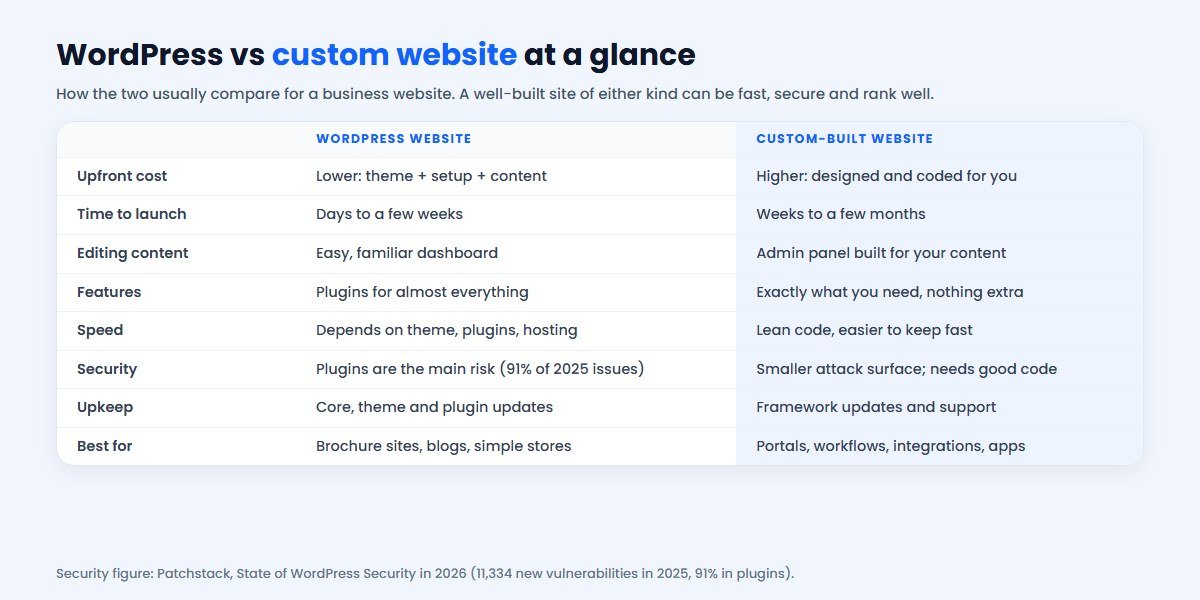
| Factor | WordPress website | Custom website |
|---|---|---|
| Upfront cost | Lower | Higher |
| Time to launch | Days to a few weeks | Weeks to a few months |
| Editing | Familiar dashboard, many tutorials | Admin panel built around your content |
| Features | Thousands of plugins | Built exactly as needed |
| Speed | Depends heavily on theme, plugins and hosting | Lean by default; depends on the developer |
| Security | Most risk comes from plugins | Smaller attack surface; quality of code matters |
| Upkeep | Regular core, theme and plugin updates | Framework updates and developer support |
| Developer lock-in | Low: many WordPress developers | Depends on code quality and documentation |
| Best for | Brochure sites, blogs, content, simple stores | Portals, bookings, workflows, integrations |
Cost in India: What Each Really Costs
The WordPress software is free, but a WordPress website is not: you pay for design and setup, hosting, a domain, any premium theme or plugins, and someone to keep it updated. A custom website costs more to build because every page and feature is designed and coded for you, but it has fewer recurring licence costs.
As a reference, these are CodeBase Coders' starting prices by type of project. The final quote depends on pages, features and content:
| Project | Typical fit | Starting price |
|---|---|---|
| Static website | A few fixed pages, no CMS | ₹8,000 |
| Small business website | Company site, landing pages, blog and CMS; WordPress is a common choice | ₹12,000 – ₹20,000 |
| E-commerce store | Catalogue, cart and checkout | ₹20,000 – ₹80,000 |
| Web application or custom portal | Logins, dashboards, bookings, workflows | ₹50,000 – ₹1,50,000 |
Budget for running costs as well: hosting, domain renewal, renewals of premium plugins or themes on WordPress, backups, security monitoring and updates. For a detailed breakdown see our website development cost in India guide, or get a personal estimate in two minutes with the cost calculator.
The cheaper option over five years is not always the cheaper build. A WordPress site loaded with paid plugins and frequent fixes can cost more to run than a lean custom site, while a simple WordPress site with a good host can run for years on very little.
Speed and Core Web Vitals
Google's Core Web Vitals measure how fast and stable a page feels: a "good" score means the largest content loads within 2.5 seconds (LCP), the page responds to input within 200 milliseconds (INP) and the layout barely shifts (CLS under 0.1).
- WordPress can pass all three, but heavy page builders, many plugins, large images and cheap shared hosting are common reasons it does not. Speed depends on discipline: a lightweight theme, few plugins, caching and good hosting.
- Custom websites ship only the code they need, which makes it easier to stay fast, but a careless developer can still build a slow site.
Either way, ask your developer to show Core Web Vitals results for sites they have built, not just a promise.
Security: Where the Risk Really Is
WordPress core is well maintained. The risk sits in the ecosystem around it. Patchstack's State of WordPress Security in 2026 report counted 11,334 new vulnerabilities in the WordPress ecosystem in 2025, a 42% increase on 2024. Of those, 91% were in plugins and 9% in themes, while WordPress core had just 6, all low priority. Patchstack also found that 46% of vulnerabilities did not receive a fix from the developer in time for public disclosure, and that attackers start exploiting widely used flaws within hours.
What that means for you:
- On WordPress, fewer, well-maintained plugins, automatic updates, backups, a firewall and someone responsible for maintenance keep the risk low.
- On a custom site, there is no plugin marketplace to attack, but security depends on the developer following good practice: input validation, up-to-date frameworks, secure hosting and code review.
- Either way, if the site stores personal data, India's DPDP Act makes you responsible for protecting it.
SEO: Does One Rank Better?
Google does not rank a site higher for being WordPress or custom. It ranks useful content on pages that load fast, work on mobile and are easy to crawl. WordPress makes on-page SEO easy for non-technical teams with well-known SEO plugins, clean URLs and simple publishing. A custom website can do everything WordPress does for SEO, including meta tags, structured data, sitemaps and fast pages, but it has to be built in from the start.
The bigger SEO factor is usually content: a business that publishes helpful pages regularly will outrank one that does not, whichever platform it uses.
Editing Content and Day-to-Day Use
This is where WordPress shines. Many people already know its dashboard, and adding a page, a blog post or an image needs no developer. A custom website comes with an admin panel designed around your content, which can be simpler for your team because it only shows what they need, but every new type of content has to be built in.
Ask yourself who will update the site, and how often. A marketing team publishing weekly will appreciate WordPress; a site that changes twice a year does not need it.
Features, Integrations and Growth
WordPress has a plugin for nearly everything: contact forms, bookings, memberships, multilingual sites, WooCommerce stores. That is its strength for standard needs. The trouble starts when your process is not standard: a plugin that almost fits, three plugins that conflict, or a feature that slows every page.
A custom website is built around your workflow from the start: a booking flow that matches how your clinic actually works, a dealer portal tied to your inventory, quotes that go straight into your CRM. It also makes integrations simpler, because they are written for your systems instead of adapted from a plugin.
Whichever you choose, connect your website to how you sell. For example, a WhatsApp chat widget from ConverseIQ, the WhatsApp marketing software and CRM we built, turns visitors into WhatsApp conversations and leads you can follow up, on WordPress and custom sites alike.
Maintenance After Launch: What Each Needs
A website is never finished on launch day. The upkeep is different for each, and it should be in your budget and your contract from the start.
A WordPress website needs
- Updates every month, or sooner for security fixes: WordPress core, the theme and every plugin, tested so an update does not break a page.
- Plugin housekeeping: removing plugins nobody uses, replacing abandoned ones and renewing paid licences.
- Backups stored away from the server, and a tested way to restore them.
- Security monitoring: a firewall or security service, login protection and alerts.
- Performance checks after content or plugin changes, so images and new features do not slow the site.
A custom website needs
- Framework and library updates (for example Laravel or Next.js versions and their packages), planned rather than urgent.
- Hosting and server care: operating system updates, SSL renewal, uptime monitoring and backups.
- A developer on call for bug fixes and small changes, ideally the team that knows the code.
- Documentation, so another developer can take over if needed.
In both cases, agree in writing who does this, how quickly urgent issues are handled and what it costs per month. A cheap build with no maintenance plan often becomes the most expensive option within a couple of years.
When WordPress Is the Right Choice
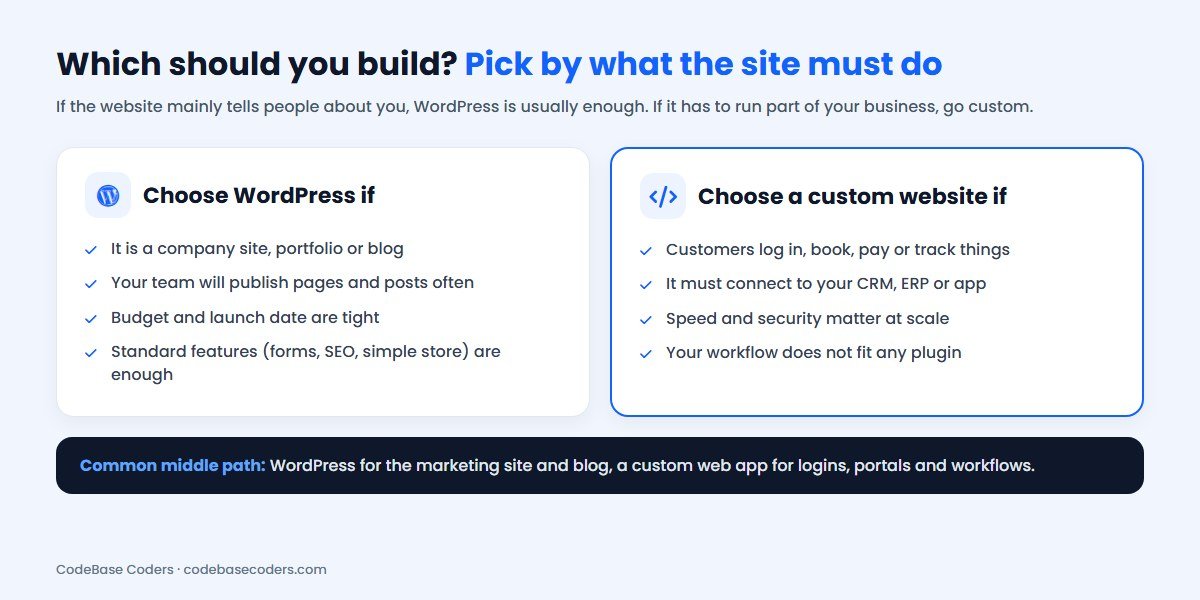
- Your site mainly presents your business: services, team, portfolio, contact.
- You will publish blog posts, news or case studies regularly.
- Budget and launch time are tight.
- Standard features cover your needs: forms, SEO, a simple store, galleries.
- You want many developers to be able to maintain it in future.
When a Custom Website Is the Right Choice
- Customers log in, book, pay, upload documents or track orders.
- The site must connect to your CRM, ERP, inventory, payment gateway or mobile app.
- Your workflow does not fit any plugin without awkward workarounds.
- Performance and security matter at scale, for example high traffic or sensitive data.
- The website is part of your product, not just a brochure.
In that case you are really building a web application. Our Laravel and React developers build these, and the web app development cost guide explains what drives the budget.
The Middle Path: WordPress Plus Custom
You do not have to choose one for everything. A common setup:
- WordPress for the public marketing site and blog, so your team can publish freely.
- A custom web application for logins, bookings, portals and anything tied to your business systems, often on a subdomain such as app.yourcompany.com.
- Integrations between the two and your CRM or WhatsApp, so leads from the website flow straight to sales.
A newer variant is "headless" WordPress: WordPress manages the content while a custom front end (for example Next.js) displays it. It combines familiar editing with a fast custom front end, at a higher build cost.
Questions to Ask Your Developer
- Why do you recommend WordPress or custom for my site?
- Which theme, page builder and plugins will you use, and are any paid yearly?
- Who handles updates, backups and security after launch, and at what cost?
- Can you show Core Web Vitals results for sites you have built?
- Will I own the code, design and all accounts (domain, hosting, analytics)?
- How will the site connect to my CRM, WhatsApp or other tools?
- What will it take to add features in a year or two?
Conclusion
The WordPress vs custom website choice comes down to what your website has to do. WordPress is the faster, cheaper way to launch a content-led business site that your team can update easily, as long as plugins are kept few and maintained. A custom website costs more up front but fits your workflow exactly, integrates cleanly with your systems and is easier to keep fast and secure at scale. Many businesses use WordPress for marketing and a custom web app for everything customers log in to. Decide by function, budget for upkeep as well as the build, and make sure you own what you pay for.
Frequently Asked Questions
Is WordPress or a custom website better for a small business?
For most small businesses that need a company site and a blog, WordPress is the better value: it is quicker to build and easy to update. A custom website makes sense once the site needs logins, bookings, payments or integrations.
Is a custom website more expensive than WordPress?
Usually yes to build, because everything is designed and coded for you. Running costs can be similar or lower, since there are no premium plugin renewals, so compare the cost over several years, not just the build.
Is WordPress secure enough for a business website?
Yes, if it is maintained. Patchstack found WordPress core had only 6 low-priority vulnerabilities in 2025, while 91% of new issues were in plugins. Use few, well-maintained plugins, keep everything updated and take backups.
Does Google rank custom websites higher than WordPress?
No. Google ranks helpful content on fast, mobile-friendly pages. Either kind of site can rank well if it is built and maintained properly.
Can I move from WordPress to a custom website later?
Yes. Content, URLs and SEO can be carried over with proper redirects. Many businesses start on WordPress and add a custom web application as they grow.
How can CodeBase Coders help me choose between WordPress and a custom website?
Tell us what your website has to do and we will recommend WordPress, a custom build or a mix, with an itemised estimate before any work starts. We build and maintain WordPress sites through our WordPress developers, custom websites and portals with our web application and Laravel teams, and connect either to your CRM or WhatsApp. If you already have a slow or hacked site, our free audit tells you whether to fix it or rebuild. Book a free consultation.
Sources
- W3Techs: Usage statistics of WordPress (26 October 2026)
- Patchstack: State of WordPress Security in 2026
- web.dev: Web Vitals and their thresholds
- WordPress.org: About WordPress
Work With CodeBase Coders
CodeBase Coders helps businesses turn ideas into scalable digital products and improve existing processes through software, automation, AI, integrations and modern web technologies. We build WordPress websites, custom websites and web applications, and we will recommend the one that fits your goals and budget.
- Web Application Development
- Hire WordPress Developers
- Hire Laravel Developers
- E-commerce Development
- UI/UX Design
- ConverseIQ WhatsApp Marketing Software
Planning a new website? Get a free consultation and estimate, or try the cost calculator first.
Rohan Verma
Founder, CodeBase CodersRohan Verma is the founder of CodeBase Coders. He helps startups, SMEs and enterprises turn ideas into scalable digital products and improve business processes through custom software, AI, automation, integrations and modern web technologies.