If your sales team has outgrown spreadsheets, or your current CRM no longer fits how you sell, you will soon face a choice: buy Salesforce, the best-known CRM in the world, or build a custom CRM around your own process. The custom CRM vs Salesforce decision is not just about features. It affects what you pay every year, how quickly your team adopts the system, how well it connects to the rest of your business and who controls your customer data.
Both options work, for different businesses. This guide compares them honestly. It uses Salesforce's published 2026 pricing, explains what a custom CRM really involves, shows how to compare total cost of ownership over three to five years and ends with a ten-question checklist you can use in your next planning meeting. If you are close to a decision, by the end you should know which way to go, or exactly what you still need to find out.
At a Glance
- Salesforce is a subscription CRM with a huge feature set, an app marketplace, built-in AI on higher editions and a large ecosystem of consultants. In 2026 it costs $25 to $550 per user per month at list price, for as long as you use it.
- A custom CRM is software built for your business. You pay mainly upfront to build it, then for hosting, support and improvements. There are no per-user licence fees, and you own the code and data.
- Salesforce usually wins when you need a standard sales process live quickly, want proven enterprise features or expect to rely on its ecosystem.
- A custom CRM usually wins when your process is unusual, you have many users who need only part of a CRM, you rely on channels like WhatsApp, or licence costs keep growing faster than the value you get.
Custom CRM vs Salesforce: The Quick Answer
If you only read one section, read this table. It is a starting point, not a verdict; the rest of the article explains the reasoning.
| Your situation | Usually the better fit |
|---|---|
| A standard B2B sales pipeline: leads, opportunities, quotes, forecasts | Salesforce (or another off-the-shelf CRM) |
| You need a CRM live in weeks with minimal development | Salesforce |
| Enterprise needs: complex permissions, global teams, many add-on clouds | Salesforce |
| Your workflow is specific to your industry, such as admissions, site visits, loan files or field service | Custom CRM |
| Many users who only need a few screens, such as field agents, dealers or franchisees | Custom CRM |
| WhatsApp, calls and local payment methods are your main sales channels | Custom CRM, or a CRM with strong custom integrations |
| You want to sell your CRM to others, or it is part of your product | Custom CRM |
| You already use Salesforce but your team works around it | Extend Salesforce first; consider custom if gaps are fundamental |
What You Get With Salesforce in 2026
Salesforce's sales product, Sales Cloud, is sold in editions. Each edition adds features, and the price per user rises with them. These are the list prices on Salesforce's pricing page in October 2026:
| Edition | List price (USD per user per month) | Billing | What it adds |
|---|---|---|---|
| Free Suite | $0 | n/a | An entry point for very small teams |
| Starter Suite | $25 | Monthly or annually | Lead, account, contact and opportunity management; sales flows and lead routing; email marketing |
| Pro Suite | $100 | Annually | More customisation and automation; quoting and forecasting |
| Core | $195 | Annually | Built-in AI, Slack and Tableau Next |
| Advanced | $395 | Annually | Enhanced security, more AI and data capacity, backup and data tools |
| Max | $550 | Annually | Salesforce's full AI suite, including Agentforce for Sales, plus sales planning and incentive tools |
A few details matter when you budget:
- AI costs extra below Core. Salesforce says AI can be added to Core and above. Agentforce for Sales, its AI agent product, is listed from $125 per user per month.
- Support plans scale with your bill. Standard support is included. Salesforce lists its Premier Success Plan at 30% of net licence fees.
- Add-ons are separate. Revenue Intelligence, Revenue Cloud, partner portals and other products are priced on their own.
- Prices are list prices. Salesforce publishes USD prices and says pricing is subject to change. It does not publish rupee prices, so Indian buyers need a quote from Salesforce or a partner. Taxes are extra.
What you get for the money is substantial. Salesforce is mature, secure, well documented and supported by an enormous partner network and its AppExchange marketplace of add-on apps. Almost every business tool already has a Salesforce connector. For a company that wants a standard, proven CRM without running its own software, that is a strong offer.
What a Custom CRM Actually Is
A custom CRM is not a clone of Salesforce. It is a focused application that holds your customers, deals and activities, and models the way your business actually works. Typical modules include:
- Lead capture from your website, ads, WhatsApp, calls and marketplaces, with automatic assignment rules
- A pipeline with the stages, fields and approvals your team really uses
- Quotes, invoices, payment links and payment status
- Tasks, follow-up reminders and activity history
- Role-based access for sales, managers, finance and partners
- Dashboards and reports for the numbers your leadership reviews every week
- Integrations with your accounting software, ERP, telephony, email and messaging tools
- AI features such as lead scoring, call and chat summaries or reply suggestions, where they add value
Because you decide what goes in, a custom CRM can be much simpler for users than a general-purpose CRM, and it can go deeper where your business is different. A real estate company might need site-visit scheduling and inventory blocking; an education business needs admissions stages and fee instalments; a distributor needs dealer orders and credit limits. These are core workflows, not add-ons.
The trade-off is responsibility. Someone has to design, build, host, secure and maintain the system. That is either your own team or a development partner on a support contract. Our custom CRM development page explains how we approach this, and our build vs buy software guide covers the general decision in more depth.
Custom CRM vs Salesforce: Head-to-Head
| Factor | Salesforce | Custom CRM |
|---|---|---|
| Time to first use | Days to weeks for a standard setup; longer with heavy customisation | Weeks to months, depending on scope; an MVP can launch first |
| Upfront cost | Low; implementation and data migration if you use a partner | Higher; you pay for design and development |
| Ongoing cost | Per-user subscription every year, plus add-ons and support plans | Hosting, maintenance and improvements; no per-user licences |
| Fit to your process | Configurable within Salesforce's model; deep changes need specialist developers | Built around your process from the start |
| Features out of the box | Very broad: forecasting, quoting, marketing, service, analytics | Only what you build, so the first version is narrower |
| AI | Built in on Core and above; Agentforce as a paid add-on | You choose the AI models and features, and pay per use |
| Integrations | Huge library of ready connectors | Built to order through APIs; any system with an API can be connected |
| Data ownership and hosting | Salesforce's cloud; data export available | Your servers or cloud account, in the region you choose |
| Vendor dependence | Dependent on Salesforce pricing and roadmap | Dependent on whoever maintains your code; reduce this with documentation and code ownership |
| Security and compliance | Mature controls and certifications managed by Salesforce | Your responsibility; must be designed in and tested |
Neither column is better on every row. The question is which rows matter most to your business over the next three to five years.
Cost: Salesforce Licences vs Custom CRM Development
Cost is where most custom CRM vs Salesforce discussions start, and where they most often go wrong. Comparing a year-one Salesforce subscription with a custom CRM quote is misleading. Compare total cost of ownership over the period you expect to use the system.
What Salesforce costs over time
The licence maths is simple: users × price per user × 12 months. Using Salesforce's list prices:
| Users | Pro Suite ($100) | Core ($195) | Advanced ($395) |
|---|---|---|---|
| 10 users, per year | $12,000 | $23,400 | $47,400 |
| 25 users, per year | $30,000 | $58,500 | $118,500 |
| 50 users, per year | $60,000 | $117,000 | $237,000 |
| 25 users, over 5 years | $150,000 | $292,500 | $592,500 |
These figures are licences only, at list price. Your real number may be lower after negotiation, or higher once you add AI, a premium support plan, other Salesforce products, an implementation partner, admin staff and custom development on the platform. Salesforce work is a specialist skill, and consultants who customise it are not cheap.
What a custom CRM costs over time
A custom CRM has a different shape: a larger cost at the start, then a smaller, steadier cost each year. What drives it:
- Scope: the number of modules, roles, workflows and reports in the first version.
- Integrations: each connection to accounting, ERP, WhatsApp, telephony, payment gateways or your website adds work.
- Data migration: cleaning and importing years of records from spreadsheets or an old CRM.
- Mobile access: a responsive web app is cheaper than separate iOS and Android apps.
- AI features: lead scoring, summaries and assistants add build effort and usage-based model costs.
- Security and compliance: audit logs, fine-grained permissions and data-protection requirements such as India's DPDP Act.
- Running costs: hosting, backups, monitoring, bug fixes and a budget for regular improvements.
For a first estimate based on your own scope, use our project cost calculator. Treat its result as a planning range, not a quote.
How to find your break-even point
Put both options in one spreadsheet over three and five years:
- Salesforce: annual licences for your expected user count each year (including growth), plus add-ons, support plan, partner fees and internal admin time.
- Custom CRM: build cost, plus annual hosting, maintenance and an improvement budget, plus internal time to manage the project.
- Find the year when the cumulative cost lines cross.
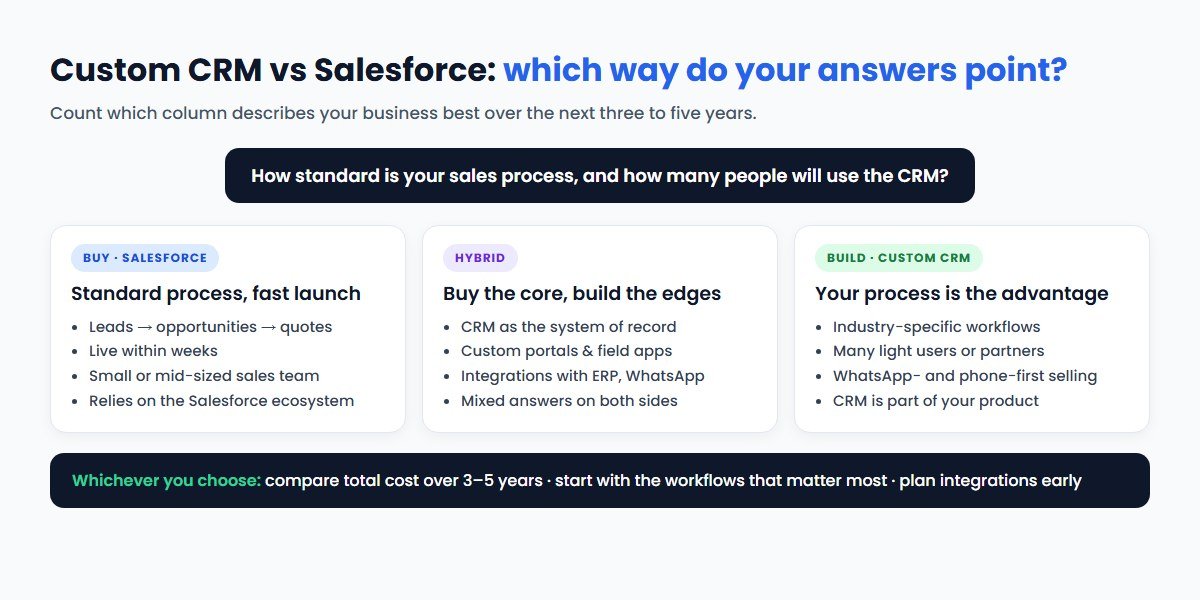
The pattern is predictable. With a handful of users, Salesforce or another subscription CRM is usually cheaper for years. As user numbers grow, especially users who only need part of a CRM, licence costs grow with every new hire, while a custom CRM's running cost barely changes. That is why companies with large field teams, dealer networks or partner portals often find that custom pays off, while a ten-person sales team rarely does.
When Salesforce Is the Right Choice
Choose Salesforce, or another established CRM, when most of these are true:
- Your sales process is fairly standard. Leads, opportunities, quotes and forecasts cover most of what you do.
- Speed matters more than fit. You need a working CRM this quarter and can adapt your process to the tool.
- You need breadth. Marketing automation, customer service, partner management and analytics on one platform.
- You are scaling a large or global team and want proven permissions, audit features and enterprise support.
- Your buyers, investors or parent company expect it, or you are hiring salespeople who already know Salesforce.
- You do not want to run software. You prefer to pay a subscription than to manage hosting, security and updates.
If you go this way, plan the implementation properly: clean your data, keep customisation lean and connect Salesforce to the systems your team already uses. Our CRM integration guide covers how to connect it to your ERP, website, accounting and messaging tools.
When a Custom CRM Is the Better Choice
A custom CRM makes sense when most of these are true:
- Your process is your advantage. The way you qualify, price, approve or fulfil is specific to your industry, and forcing it into a generic CRM slows your team down.
- You have many light users. Field agents, dealers, franchisees or channel partners who need a few screens, not a full CRM licence each.
- Your customers talk to you on WhatsApp and phone. You want conversations, calls, payment links and follow-ups in one timeline. Our guide to WhatsApp CRM explains why this matters in markets like India.
- The CRM is part of your product. You want to offer a portal to customers or sell the system as SaaS.
- Data location and control matter. You want the data in your own cloud account and region, with your own access rules.
- Licence costs are outgrowing the value. You pay for features nobody uses, but still need developers to build what you do need.
- Your team has rejected an off-the-shelf CRM before. Adoption failed because the tool did not match how people work.
The condition for success is a committed owner on your side and a development partner that treats the CRM as a long-term product, with documentation, tests and a roadmap, not a one-off project.
The Middle Path: Extend What You Buy
The choice is rarely all or nothing. Three hybrid patterns work well:
- Buy the CRM, build the edges. Keep Salesforce or another CRM as the system of record and build custom portals, mobile apps or tools around it for partners, field teams or customers. Those users often do not need full CRM licences.
- Buy the CRM, build the integrations. Connect your CRM to your ERP, billing, WhatsApp and website so data flows automatically. This removes most of the manual work that makes teams unhappy with any CRM.
- Build the core, buy the specialist tools. Run a custom CRM for your unique workflow and plug in specialist tools for email marketing, telephony or e-signatures through their APIs.
Hybrid approaches usually need good API and software integration more than anything else. Done well, they give you the reliability of a proven product with the fit of custom software.
Other Salesforce Alternatives to Consider
Custom development is not the only alternative. Before you decide, look at the wider market of Salesforce alternatives:
- HubSpot CRM: popular with marketing-led and inbound sales teams, known for ease of use and a free entry tier.
- Zoho CRM: widely used by small and mid-sized businesses, including in India, and part of a broad suite of business apps.
- Microsoft Dynamics 365: a natural fit for organisations already standardised on Microsoft 365 and Azure.
- Pipedrive: a pipeline-focused CRM for smaller sales teams that want simplicity.
- Open-source options such as Odoo or SuiteCRM: self-hosted, with code you can modify, often used as a base for customisation.
Each has its own pricing model and strengths, and pricing changes often, so check vendors' current pricing pages. The same test applies to all of them: if your process fits the product with light configuration, buy; if you spend months working around it, consider building, or building on top of an open-source base.
A 10-Question Decision Checklist
Answer these with your sales, finance and operations leads in the room:
- How many CRM users will we have now, in two years and in five years, and how many of them need full access?
- Which three workflows matter most, and can Salesforce handle them with configuration alone?
- Which systems must the CRM connect to, and do ready connectors exist for each?
- Which channels do our customers use most: email, phone, WhatsApp, website, marketplaces?
- Which AI features would save real time, and what would they cost on each option?
- Where must our customer data be stored, and who must be able to access it?
- What is the total cost of each option over three and five years, including people and partners?
- How soon do we need the system live, and can we start with a smaller first version?
- Who will own the CRM internally, and who will support it after launch?
- If we change our mind in three years, how hard is it to leave?
If most answers point to standard needs, a fast launch and a small team, buy. If they point to unique workflows, many users, specific channels or ownership, build or go hybrid.
How CodeBase Coders Helps
CodeBase Coders helps businesses turn ideas into scalable digital products and improve existing processes through software, automation, AI, integrations and modern web technologies. For CRM decisions, that means we can support either path:
| What you need | How we help | Service |
|---|---|---|
| An independent recommendation | Review your process, users, integrations and costs, and compare options before you commit | IT Consulting |
| A CRM built for your process | Design and build a custom CRM with the modules, roles, dashboards and mobile access you need | Custom CRM Development |
| Connect Salesforce or any CRM | Integrate your CRM with ERP, accounting, website forms, payment gateways and telephony | Software & API Integration |
| WhatsApp and AI in your CRM | WhatsApp conversations, chatbots, lead scoring and summaries inside your sales workflow | AI Integration, AI Chatbots |
| Automate sales operations | Lead routing, follow-ups, approvals and reports that run without manual work | AI Agents & Automation |
| Replace an old CRM | Migrate data and workflows from spreadsheets, legacy systems or Salesforce | Legacy Modernisation |
| Long-term care | Hosting, monitoring, fixes and a roadmap of improvements after launch | Managed IT & Support |
We will tell you if an off-the-shelf CRM is the better fit. A custom CRM that should not have been built helps nobody.
Conclusion
The custom CRM vs Salesforce choice comes down to fit, scale and ownership. Salesforce gives you a proven, feature-rich CRM quickly, at a per-user price that rises with your team and your edition. A custom CRM costs more at the start but fits your process exactly, has no per-user licences and keeps your data and roadmap in your hands.
If your process is standard and your team is small, buy and configure carefully. If your workflow is your advantage, your user count is large or your customers live on WhatsApp, build, or extend a bought CRM with custom modules. Whichever way you go, compare total cost over three to five years, start with the workflows that matter most and plan for integrations from day one.
Frequently Asked Questions
Is a custom CRM cheaper than Salesforce?
It depends on your user count and how long you keep the system. Salesforce costs little upfront but charges per user every year, from $25 to $550 per user per month at list price in 2026. A custom CRM costs more to build but has no per-user licence fees. With few users, Salesforce is often cheaper for years; with many users, a custom CRM often costs less over three to five years.
How much does Salesforce cost in 2026?
Salesforce's Sales Cloud list prices in October 2026 are $25 (Starter Suite), $100 (Pro Suite), $195 (Core), $395 (Advanced) and $550 (Max) per user per month, with all but Starter billed annually. A Free Suite is also listed. AI add-ons, premium support and other products cost extra, and Salesforce does not publish rupee prices.
When should a business build a custom CRM instead of using Salesforce?
Build when your workflow is specific to your industry, you have many users who only need part of a CRM, your customers mainly use WhatsApp or phone, the CRM is part of your product, or you need full control of data and hosting. If your sales process is standard and you need it live quickly, Salesforce or another off-the-shelf CRM is usually better.
How long does it take to build a custom CRM?
It depends on scope. A focused first version with core pipeline, contacts, tasks and reports can launch sooner than a full system with many integrations, mobile apps and AI. Starting with a smaller first version and adding modules in phases keeps timelines and risk down. Our cost calculator gives an indicative timeline for your scope.
Can a custom CRM integrate with WhatsApp, accounting and ERP systems?
Yes. A custom CRM can connect to any system that offers an API, including the WhatsApp Business Platform, accounting tools, ERPs, payment gateways, telephony and your website. Integrations are designed around your workflow rather than limited to available connectors.
Can I move my data from Salesforce to a custom CRM?
Yes. Salesforce lets you export your data, which can then be cleaned, mapped and imported into a new system. Plan the migration carefully, rebuild critical workflows first, run both systems in parallel briefly and time the switch to your renewal date.
How can CodeBase Coders help me choose between a custom CRM and Salesforce?
CodeBase Coders starts with your sales process, user count and integrations, not with a product to sell. If Salesforce or another CRM fits, we help you configure it and connect it to your other systems. If a custom CRM is the better long-term choice, we design and build it, including WhatsApp, payments, AI and reporting. Explore our custom CRM development, CRM and API integration and IT consulting services, or book a free consultation.
Sources
- Salesforce: Sales Cloud pricing (editions, add-ons and Success Plans), accessed 20 October 2026
- Salesforce AppExchange: business apps and connectors
- Salesforce Trailhead: Export your data (Data Export Service)
Work With CodeBase Coders
CodeBase Coders helps businesses turn ideas into scalable digital products and improve existing processes through software, automation, AI, integrations and modern web technologies. Whether you choose Salesforce, another CRM or a system built for you, we can help you plan it, build it, connect it and keep it running.
- Custom CRM Development
- Software & API Integration Services
- IT Consulting
- AI Integration Services
- AI Chatbot & WhatsApp Chatbot Development
- AI Agent Development
- Web Application Development
- SaaS Development
- Dedicated Development Team
- Managed IT Services & Support
Deciding between a custom CRM and Salesforce? Book a free consultation with CodeBase Coders and we will review your sales process, users and integrations and give you an honest recommendation.
Rohan Verma
Founder, CodeBase CodersRohan Verma is the founder of CodeBase Coders. He helps startups, SMEs and enterprises turn ideas into scalable digital products and improve business processes through custom software, AI, automation, integrations and modern web technologies.