Building separate iOS and Android apps doubles much of your work. That is why most new business apps are built cross-platform, with one codebase for both stores. When you get to that point, the question is almost always Flutter vs React Native. Google's Flutter and Meta's React Native are the two leading cross-platform frameworks, both are mature and free, and both power apps used by millions of people.
The wrong choice rarely sinks a product, but it does affect your budget, your hiring, how your app looks and feels, and how easy it is to maintain for years. Both frameworks also changed significantly in 2025 and 2026, so older comparisons are out of date. This guide explains the differences in plain language, covers the latest releases, compares performance, UI, cost and team fit, and gives you a clear way to decide.
At a Glance
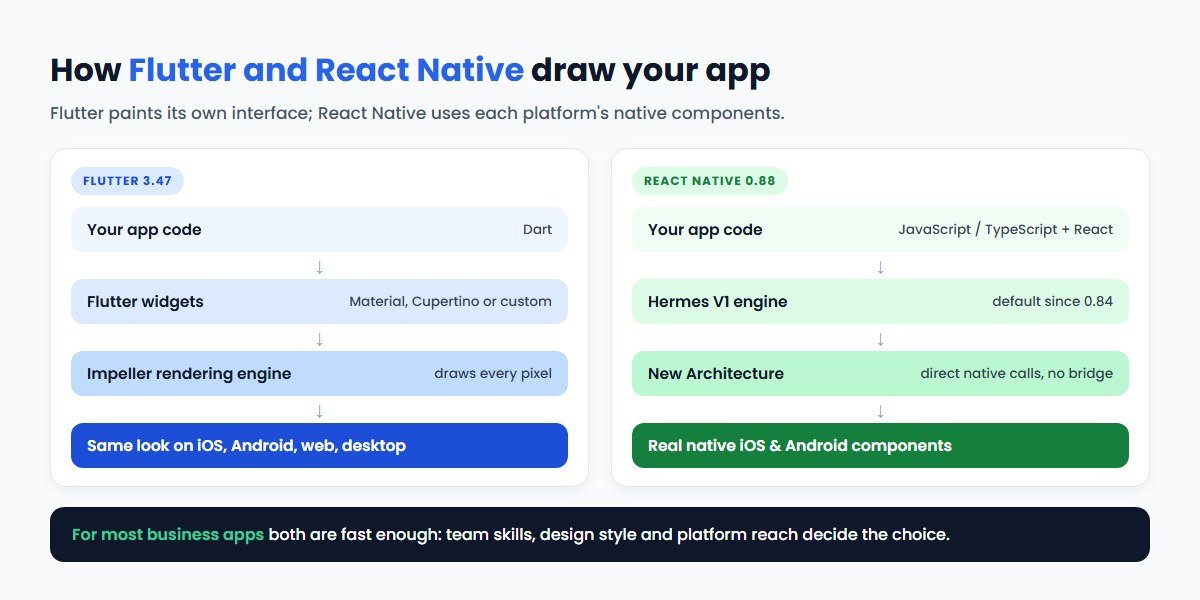
- Flutter uses the Dart language and draws every pixel of its interface with its own rendering engine, Impeller. Your app looks the same on every device and can also target web and desktop.
- React Native uses JavaScript or TypeScript and React, and displays real native iOS and Android interface components. It shares skills and some code with React web apps.
- Latest versions: Flutter 3.47 is the current stable release in Flutter's documentation. React Native 0.88 was released on 19 October 2026.
- Big recent changes: React Native now runs only on its New Architecture and uses Hermes V1 by default. Flutter's Impeller engine is now the default on mobile and desktop.
- Choose Flutter for a highly branded, consistent UI, custom animations or one codebase across mobile, web and desktop.
- Choose React Native if your team knows React or TypeScript, you want a native platform feel, or you want to share logic with a React web app.
- Choose native (Swift and Kotlin) when the app depends on deep platform features or the very latest OS capabilities.
Flutter vs React Native: The Quick Answer
| If you are building… | Usually the better fit |
|---|---|
| A consumer app with a strong, custom brand look and rich animation | Flutter |
| An app that must look identical on iOS, Android, web and desktop | Flutter |
| A product with an existing React web app and a JavaScript/TypeScript team | React Native |
| An app that should feel like a standard iOS or Android app | React Native |
| An MVP that needs to launch fast on both stores | Either; choose the one your team knows |
| Business apps: booking, e-commerce, field service, internal tools | Either; both are proven here |
| An app built around AR, advanced camera, Bluetooth hardware or new OS features | Native, or cross-platform with native modules |
| Adding new screens to an existing native app | React Native or Flutter add-to-app; decide on team skills |
What Is Flutter?
Flutter is Google's open-source UI toolkit for building apps for mobile, web and desktop from a single codebase. You write Flutter apps in Dart, a typed language also developed by Google. Instead of using the platform's own buttons and lists, Flutter draws its interface itself, using a library of widgets that follow Material Design or Apple-style Cupertino design, or your own custom design.
That approach has two consequences. First, your app looks and behaves the same everywhere, which designers love and testers appreciate. Second, Flutter has to recreate platform behaviour, so it is in charge of matching platform conventions and accessibility rather than inheriting them automatically. In practice, Flutter does this well for most business and consumer apps.
Flutter's rendering engine is Impeller. According to Flutter's documentation, it is the only renderer on iOS, the default on Android devices running API 29 or later (older devices fall back to OpenGL), and, as of Flutter 3.47, the default on macOS, Windows and Linux. Flutter on the web uses Skia-based rendering.
What Is React Native?
React Native is Meta's open-source framework for building native apps with React, the same library many teams use for websites. You write in JavaScript or, more commonly today, TypeScript. Your components map to real native interface elements, so a list or text field in a React Native app is the platform's own list or text field.
This gives React Native apps a native look and feel by default and lets web developers who know React become productive on mobile quickly. Business logic, validation and API code can often be shared with a React web app. The trade-off is that the UI can differ slightly between iOS and Android, because each platform renders its own components.
Most new React Native projects start with Expo, a framework and set of tools on top of React Native that handles builds, updates, device APIs and app store submission. Expo SDK 55, released in February 2026, shipped with React Native 0.83 and React 19.2. React Native is also expanding beyond phones; in February 2026 the React Native team described building VR apps for Meta Quest.
What Changed in 2025 and 2026
If you last compared these frameworks a few years ago, several old arguments no longer apply.
React Native: the New Architecture is now the only architecture
- React Native 0.82 (October 2025) was the first release to run entirely on the New Architecture, which replaces the old asynchronous "bridge" between JavaScript and native code with a faster, more direct system.
- React Native 0.84 (February 2026) made Hermes V1 the default JavaScript engine and switched to precompiled iOS binaries by default, which speeds up builds.
- React Native 0.86 (June 2026) added edge-to-edge support on Android 15 and later.
- React Native 0.87 (August 2026) made the Strict TypeScript API the default and raised the minimum toolchain to Node.js 22.
- React Native 0.88 (19 October 2026) moved to React 19.3 with no breaking changes, plus variable font support and experimental Swift Package Manager support.
The practical result: the "bridge bottleneck" that older articles blame for React Native performance problems is gone. Apps still built on old versions, though, face a real upgrade project.
Flutter: Impeller everywhere
- Impeller replaced Skia as the default renderer on iOS and modern Android, removing the shader compilation "jank" that used to cause stutters the first time an animation ran.
- Flutter 3.47 made Impeller the default on Windows, macOS and Linux, and Flutter's documentation says the option to turn it off will be removed in a future release.
- Flutter continues to release stable versions several times a year, with improvements to desktop windowing, web rendering and Dart.
Flutter vs React Native: Head-to-Head
| Factor | Flutter | React Native |
|---|---|---|
| Backed by | Meta | |
| Language | Dart | JavaScript / TypeScript with React |
| How the UI is drawn | Own rendering engine (Impeller) and widgets | Native platform components |
| Look and feel | Identical across platforms; fully custom designs are easy | Native feel by default; may differ slightly by platform |
| Platforms | iOS, Android, web, Windows, macOS, Linux | iOS and Android; web, desktop and VR through additional projects |
| Code sharing with web | Flutter web shares the whole app; less suited to SEO-heavy sites | Share logic and skills with React web apps |
| Tooling | Flutter CLI, DevTools, hot reload | Expo, React Native DevTools, fast refresh |
| Package ecosystem | pub.dev, growing steadily | npm, very large, plus React Native-specific libraries |
| Native features | Plugins, or platform channels for custom native code | Native modules (Turbo Modules), Expo modules |
| Hiring pool | Dart is a smaller pool; Flutter specialists are widely available | Draws on the very large JavaScript and React community |
| Over-the-air updates | Limited; usually through store releases | Supported through Expo's update service, within store rules |
Performance and User Interface
Performance
For typical business apps, both frameworks are fast enough that users cannot tell the difference. Lists scroll smoothly, screens open quickly and animations run at the device's refresh rate when the app is built well. The differences show up at the edges:
- Heavy custom graphics and animation: Flutter has an advantage because it controls the whole rendering pipeline.
- Apps with many native screens and platform components: React Native has an advantage because it uses those components directly.
- Startup time and app size: both have improved; Hermes V1 and precompilation help React Native, and Flutter apps include their engine. Measure on your target devices rather than relying on generic benchmarks.
In real projects, performance problems almost always come from how the app is built: unoptimised images, too many network calls, heavy work on the main thread or poor state management. A good team will build a fast app on either framework.
User interface and design
Flutter suits apps where design is part of the brand: custom shapes, motion, illustrations and a look that is identical across platforms. Designers' mock-ups translate directly into widgets. React Native suits apps that should feel at home on each platform, such as banking, utilities and enterprise apps where users expect standard iOS and Android behaviour. Both can do either style; one simply takes less effort than the other. Good UI/UX design matters more than the framework.
Team, Hiring and Developer Experience
For many businesses, team fit decides the Flutter vs React Native question more than technology does.
- You already have React or TypeScript developers: React Native lets them work on mobile with a short learning curve, and they can share code and patterns with your web app.
- You are hiring a new mobile team: both frameworks have experienced developers available, including in India. Dart is easy to learn for developers with Java, Kotlin, Swift or C# experience.
- You use an outsourcing partner or dedicated team: ask what they have shipped in each framework and pick the one they can maintain well. Our guide to hiring dedicated developers in India covers how to evaluate a team.
Developer experience is strong on both. Flutter's hot reload and integrated tooling are well regarded, and Dart's type system catches many errors early. React Native's fast refresh, Expo's tooling and TypeScript give web developers a familiar workflow. With React Native now defaulting to its Strict TypeScript API, type safety is closer to what Flutter teams get from Dart.
Cost and Timeline
Neither framework is free in practice; you pay for the people who build and maintain the app. Cost differences between Flutter and React Native are usually small compared with the cost drivers both share: number of screens and user roles, integrations, payments, real-time features, offline mode, admin panels and AI features.
Where the framework does affect cost:
- Reuse of existing work: if you have a React web app, React Native can reuse logic and skills. If you need web and desktop too, Flutter can cover them from one codebase.
- Custom design: a highly custom UI is usually faster to build in Flutter.
- Native integrations: unusual hardware or SDKs may have better support in one ecosystem; check the specific libraries you need before you commit.
- Long-term maintenance: both frameworks release regularly, and keeping up with upgrades should be part of your budget. React Native's move to the New Architecture made upgrades a significant project for older apps.
Compared with building two native apps, either cross-platform framework usually reduces cost and time to market for business apps. For budget ranges by app type, see our mobile app development cost breakdown, or try the project cost calculator for an estimate based on your features.
When to Choose Flutter
- Your app's visual design is a key part of the product and should look identical everywhere.
- You need rich custom animations, charts, illustrations or game-like interactions.
- You want one codebase for mobile plus desktop or web app experiences, such as dashboards or internal tools.
- You are building a new team and value an integrated, consistent toolkit.
- You target a wide range of Android devices and want consistent rendering across them.
When to Choose React Native
- Your team already knows React, JavaScript or TypeScript.
- You have a React web app and want to share logic, design patterns and developers.
- You want your app to feel like a standard iOS and Android app.
- You want to ship small fixes quickly with over-the-air updates through Expo, within app store rules.
- You are adding React Native screens to an existing native app step by step.
When Native or a PWA Is the Better Choice
Cross-platform is not always the answer. Build native apps in Swift for iOS and Kotlin for Android when the product depends on deep platform features such as AR, advanced camera processing, complex background tasks, specialised Bluetooth hardware, widgets and watch apps, or when you need new OS features on the day they launch. Some teams also use Kotlin Multiplatform to share business logic while keeping native interfaces.
At the other end, a progressive web app may be enough for internal tools, customer portals or simple ordering apps. It runs in the browser, can be installed and avoids app store review, but it has limited device access and less store visibility.
Already Have an App? Rebuild, Migrate or Keep
If you already have an app, framework choice is a different question:
- Old React Native app: upgrading to the New Architecture is usually cheaper than rebuilding, but plan for library updates and testing.
- Old Flutter app: Flutter upgrades are usually incremental; check that your plugins are maintained.
- Two native apps that are expensive to maintain: consider adding new features in Flutter or React Native inside the existing apps and migrating screen by screen.
- An app that works and sells: do not rewrite it just to change framework. Rewrite only for a clear business reason: cost, speed of change, performance or hiring.
Our legacy application modernisation guide explains how to weigh refactoring against rebuilding.
A Decision Checklist
- What does our team already know: React and TypeScript, Dart, or native?
- Should the app look identical everywhere, or feel native on each platform?
- Do we need web or desktop versions from the same code?
- Which device features and third-party SDKs must we support, and is each well supported in both frameworks?
- Do we have an existing web app or native app we want to share code with?
- How will we hire and retain developers for this framework over the next three years?
- Who will handle framework upgrades and app store changes after launch?
If you answer "React team, native feel, shared web code", choose React Native. If you answer "custom brand UI, multiple platforms, new team", choose Flutter. If you answer "deep device features", consider native.
How CodeBase Coders Helps
CodeBase Coders helps businesses turn ideas into scalable digital products and improve existing processes through software, automation, AI, integrations and modern web technologies. For mobile apps, we work with both Flutter and React Native and recommend the framework that fits your product and team:
| What you need | How we help | Service |
|---|---|---|
| Choose the right stack | Review your goals, features, team and budget, and recommend Flutter, React Native, native or a PWA | Mobile App Consulting |
| Design the app | User research, flows, prototypes and a design system for iOS and Android | UI/UX Design |
| Build and launch | Cross-platform development, back end, admin panel, testing and app store submission | Mobile App Development |
| Launch an MVP | A focused first version to test your idea with real users | Product Engineering |
| Add AI features | Assistants, search, recommendations and chat inside your app | AI Integration |
| Connect your systems | Payments, CRM, ERP, maps and messaging through APIs | Software & API Integration |
| Test and support | QA on real devices, upgrades, monitoring and improvements after launch | Quality Assurance, Managed IT & Support |
Conclusion
In 2026, Flutter vs React Native is a choice between two strong, actively developed frameworks, not between a good option and a weak one. React Native's New Architecture and Hermes V1 have removed many of its old performance concerns, and Flutter's Impeller engine now powers its mobile and desktop apps by default.
Choose Flutter when a consistent, custom design and multi-platform reach matter most. Choose React Native when your team and web product are built on React and you want a native feel. Choose native when the app lives on deep device features. Above all, choose the framework your team can build and maintain well for years, because that matters more to your users than any benchmark.
Frequently Asked Questions
Is Flutter better than React Native in 2026?
Neither is better for every app. Flutter is usually better for custom, brand-heavy designs and for one codebase across mobile, web and desktop. React Native is usually better for teams that know React or TypeScript, for apps that should feel native on each platform and for sharing code with a React web app.
Which is faster, Flutter or React Native?
For most business apps, users will not notice a difference. Flutter has an edge in heavy custom animation because it controls its own rendering with Impeller. React Native's New Architecture and Hermes V1 engine have closed much of the old gap. App quality and optimisation matter more than the framework.
What are the latest versions of Flutter and React Native?
At the time of writing, Flutter 3.47 is the current stable release in Flutter's documentation, and React Native 0.88 was released on 19 October 2026. Both frameworks release regularly, so check their official release notes for updates.
Is Flutter or React Native cheaper for app development?
The cost difference between the two is usually small. Scope, integrations, design complexity and your team's existing skills affect cost far more. Either framework is usually cheaper than building separate native iOS and Android apps.
Can Flutter and React Native apps access device features?
Yes. Both support cameras, location, notifications, biometrics, payments and most common device features through plugins or modules, and both let developers write custom native code when needed. Check support for any specialised hardware or SDK before you choose.
Should I rebuild my existing app in Flutter or React Native?
Only if there is a clear business reason, such as high maintenance cost for two native apps or an outdated codebase that blocks new features. Often, upgrading the existing app or migrating screen by screen is cheaper and less risky than a full rewrite.
How can CodeBase Coders help me choose between Flutter and React Native?
CodeBase Coders builds cross-platform apps with both Flutter and React Native, so we can recommend the one that fits your product, team and budget rather than the one we prefer. We help with discovery, design, development, testing, app store launch and ongoing support, and we can review an existing app before you decide to rebuild or migrate. Explore our mobile app development, mobile app consulting and UI/UX design services, or book a free consultation.
Sources
- Flutter documentation: Release notes (Flutter 3.47)
- Flutter documentation: Impeller rendering engine
- React Native blog: release announcements 0.82 to 0.88
- Expo changelog: Expo SDK 55
Work With CodeBase Coders
CodeBase Coders helps businesses turn ideas into scalable digital products and improve existing processes through software, automation, AI, integrations and modern web technologies. We design, build and support cross-platform apps in Flutter and React Native, and we will tell you honestly which one fits your product.
- Mobile App Development
- Mobile App Consulting
- UI/UX Design
- Product Engineering
- Progressive Web Apps
- Web Application Development
- AI Integration Services
- Quality Assurance
- Dedicated Development Team
- Managed IT Services & Support
Choosing between Flutter and React Native? Book a free consultation with CodeBase Coders and we will review your app idea, features and team and recommend the right framework.
Rohan Verma
Founder, CodeBase CodersRohan Verma is the founder of CodeBase Coders. He helps startups, SMEs and enterprises turn ideas into scalable digital products and improve business processes through custom software, AI, automation, integrations and modern web technologies.