Most schools reach the same point sooner or later. Fees are tracked in spreadsheets and receipt books, attendance is marked on paper and typed in again, report cards take a week of late evenings, and the office phone rings all day with parents asking about dues, homework and bus timings. School ERP software is meant to fix this. The harder question is which kind to buy: a readymade vs custom school ERP.
A readymade school ERP is quick to start and costs a predictable yearly fee. A custom school ERP is built around the way your school works and belongs to you, but it takes longer and costs more up front. Picking the wrong one is expensive either way: staff stop using software that fights their routine, and a custom build is wasted money if a standard product would have done the job.
This guide compares the two on cost, features, student data and India's new data protection rules, fee collection, parent communication and long-term control. It ends with a simple way to decide and the questions to ask any vendor. A note before we start: CodeBase Coders builds custom school ERP software, so we have tried to be fair about when a readymade product is the better choice.
At a Glance
- Readymade school ERP: a subscription product used by many schools. Fast to start, lower first-year cost, but you work the way the product works and pay every year.
- Custom school ERP: software built for your school or school group. Fits your fee rules, report formats and branches, and you own the code and data, but it needs a bigger first investment and a few months to build.
- Best for a readymade ERP: a single school with standard processes, a tight budget and a need to go live this term.
- Best for a custom ERP: school groups with several branches, unusual fee structures, their own branded parent app, or software that must connect closely with other systems.
- Either way: under India's DPDP rules, student data needs verifiable parental consent and proper safeguards, so check how any ERP handles it.
What School ERP Software Does
School ERP software (also called school management software) brings a school's day-to-day work into one system. Instead of separate registers, spreadsheets and WhatsApp groups, staff, parents and management work from the same records. Most school ERPs cover the same core modules:
- Admissions: online enquiry and application forms, document upload, entrance tests and admission status.
- Fees: fee structures, instalments, concessions, late fees, online payment, receipts and dues reminders.
- Attendance: class-wise attendance from a teacher app, with absence alerts to parents.
- Exams and report cards: marks entry, grading rules for your board and report cards in your format.
- Timetable and staff: timetables, substitutions, staff records, leave and payroll inputs.
- Transport: routes, stops, bus fees and, where buses have GPS devices, live bus location.
- Parent and student app: homework, circulars, fee dues, results and attendance in one place.
- Management reports: admissions, fee collection and attendance across classes and branches.
Both readymade and custom school ERPs can do all of this. The difference is how closely each module fits your school, who controls the software and the data, and how the cost adds up over the years.
Readymade vs Custom School ERP: The Quick Answer
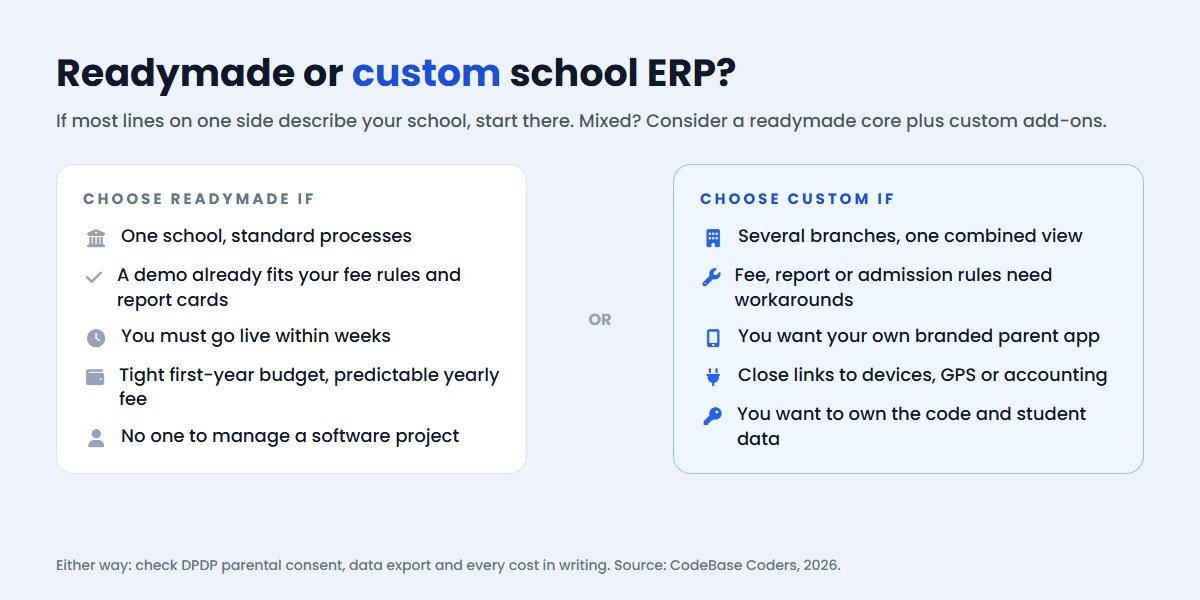
If your school runs standard processes and a product you have tried in a demo covers them, start with a readymade school ERP. It is the faster and cheaper way to stop working on paper.
If you run several branches, your fee rules or reports do not fit any product you have seen, you want your own branded app for parents, or you are paying for an ERP that staff work around instead of using, a custom school ERP is worth pricing. Over five years or more it can cost less than a subscription that charges per student or per branch, and it grows with you instead of holding you back.
Many schools land in between: a readymade core with a few custom pieces around it. We cover that option later in this guide.
What a Readymade School ERP Costs
Readymade school ERPs are usually sold as a yearly subscription. Indian vendors most often price per student per year, per branch, or by plan, and many share prices only after a demo. Because published prices are rare and the figures on review sites often disagree, we have not quoted a market average here. Ask for a written quote instead.
One vendor that does publish prices is Fedena. On 30 October 2026 its pricing page listed three plans, billed yearly and shown in dollars:
| Fedena plan | Listed price | Notes from the pricing page |
|---|---|---|
| Standard | $999 | Billed yearly; unlimited users |
| Premium | $1,399 | Billed yearly; unlimited users |
| Ultimate | $1,699 | Billed yearly; marked "Most Popular" |
| Enterprise | Contact Sales | The only plan that lists Product source code |
All Fedena plans list one-to-one online training, automatic updates, email and phone support, onboarding data and configuration, and free cloud hosting. Note the last row: on the standard plans you rent the software, and only the Enterprise plan includes the source code.
Whatever vendor you look at, the subscription is only part of the cost. Ask about these before you compare quotes:
- Setup and data migration: moving existing student, fee and staff records into the new system.
- Mobile apps: whether the parent and teacher apps are included or charged separately, and whether they carry your school's name.
- Per-student or per-branch growth: how the price changes when you add students or open a new branch.
- SMS and messaging: alerts to parents usually cost extra per message.
- Payment gateway fees: online fee collection carries gateway charges, set by your gateway provider.
- Changes and custom reports: whether the vendor will change a report card or fee rule for you, and what it costs.
- Price increases: how much the subscription can rise at renewal.
What a Custom School ERP Costs
A custom school ERP is a one-time development project, followed by hosting and a maintenance plan. There is no single price, because the cost depends on what you build. The main drivers are:
- Number of modules in the first phase. Fees, attendance and a parent app cost far less than all eight modules at once.
- Mobile apps. A parent and teacher app on Android and iOS adds to the cost; a mobile-friendly web app costs less.
- Branches and roles. A multi-branch setup with separate data and a combined management view takes more work.
- Fee and report complexity. Concessions, sibling discounts, transport fees and board-specific report cards each add rules to build and test.
- Integrations. Payment gateways, SMS and WhatsApp alerts, biometric or RFID attendance devices, GPS on buses, and accounting software.
- Data migration. Cleaning and importing years of records from spreadsheets or an old system.
After launch, budget for cloud hosting, SSL, app store accounts if you publish apps, and a maintenance plan for updates, security fixes and small changes. The big difference from a subscription is that these running costs do not grow with every student you admit.
The fastest way to a realistic number is a short call about your modules and branches, followed by a written estimate. For a rough range first, try our cost calculator or read our custom CRM and ERP cost guide.
Side-by-Side Comparison
| Readymade school ERP | Custom school ERP | |
|---|---|---|
| Time to go live | Days to weeks | A few months, in phases |
| First-year cost | Lower | Higher |
| Cost over 5+ years | Grows with students, branches and renewals | Mostly hosting and maintenance after the build |
| Fit with your processes | You adapt to the product | Built around your rules and formats |
| Parent app | Vendor's app, sometimes with your logo | Your own branded app |
| Changes | On the vendor's roadmap | When you need them |
| Code and data ownership | Vendor owns the software; check data export | You own the code and data |
| Updates and security | Handled by the vendor | Handled by your developer under a maintenance plan |
| Risk | Vendor raises prices, changes features or shuts down | Choosing a weak developer; scope creep |
Student Data, Parental Consent and the DPDP Act
A school ERP holds some of the most sensitive data a school has: children's names, dates of birth, addresses, photos, health notes, marks and parents' phone numbers. India's Digital Personal Data Protection Act, 2023 and the DPDP Rules, notified on 13 November 2025 with an 18-month phase-in, set clear duties for anyone handling it.
- A child is anyone under 18. Almost every student record in a school ERP is a child's data.
- Verifiable parental consent. Before processing a child's personal data, the school needs verifiable consent from a parent or lawful guardian.
- No tracking or targeted ads at children. Behavioural monitoring and targeted advertising directed at children are not allowed, subject to limited exemptions.
- Security and breach reporting. Reasonable safeguards are required, and breaches must be reported.
- Penalties. The Act's schedule allows penalties of up to ₹250 crore for failing to take reasonable security safeguards and up to ₹200 crore for failing to meet the obligations on children's data.
This matters for the readymade vs custom choice. With a readymade ERP, ask the vendor where data is stored, how parental consent is recorded, who can see which records, and how you export or delete data. With a custom ERP, these are design decisions you control: role-based access, audit logs, encryption and a consent flow built into admissions from day one.
Government systems are moving the same way. Under APAAR, part of the "One Nation, One Student ID" programme aligned with the National Education Policy 2020, schools create student IDs after obtaining parental consent for minors and keep student records updated in UDISE+. Whichever ERP you choose, check that it can export the student data you need for these systems in a clean format. This is general information, not legal advice; speak to a lawyer about your school's obligations.
Fees, Payments and Parent Communication
For most schools, fees are where an ERP pays for itself. A good fee module calculates instalments, concessions and late fees automatically, lets parents pay online by UPI, cards or net banking, sends receipts instantly and reminds parents before dues fall late.
Readymade ERPs usually support the common payment gateways and standard fee rules. Where they struggle is the unusual case: sibling discounts that depend on the branch, staff-child concessions, transport fees by distance, or a fee policy that changed mid-year. If your accounts team keeps a spreadsheet next to the ERP to handle these, the ERP is not doing its job.
Parent communication works the same way. Most readymade products send SMS or app notifications. A custom ERP can send absence alerts, fee reminders and circulars on the channels your parents actually read, including WhatsApp through the official Business API, with the school's own name and templates. We build these connections through our software and API integration services.
When a Readymade School ERP Is the Better Fit
A readymade school ERP is usually the right choice when:
- You run a single school with standard admissions, fee and exam processes.
- A product you tried in a demo covers your report card format and fee rules without workarounds.
- You need to go live within weeks, for example before a new session starts.
- Your budget for the first year is limited and you prefer a predictable yearly fee.
- You do not have anyone to manage a software project or a developer relationship.
In these cases, building custom software would mean paying more to solve problems you do not have. Choose a well-supported product, check the questions at the end of this guide, and move your school off paper.
When a Custom School ERP Is the Better Fit
A custom school ERP makes sense when:
- You run several branches or a large campus, and need each branch's data kept separate with a combined view for management.
- Your processes do not fit any product. Fee rules, report cards, admissions steps or hostel and transport arrangements need workarounds in every ERP you have tried.
- You want your own parent app, with your school's name in the app stores and full control of what parents see.
- You need close integration with biometric devices, GPS on buses, an accounting system, a learning platform or your website's admission forms.
- You want to own your student data and software instead of renting them, especially if you plan to grow.
- Your yearly subscription keeps rising as you add students and branches.
The best custom projects start small. Build the module that causes the most pain first, usually fees or attendance, get staff using it, then add the rest in phases.
The Middle Path: Readymade Core Plus Custom Add-ons
You do not always have to choose one side. Some schools keep a readymade ERP for the standard modules and add custom software around it:
- A custom admissions website and enquiry form that sends leads into the ERP.
- A branded parent app that reads data from the ERP through its API.
- A management dashboard that combines data from several branches or systems.
- Custom integrations with payment gateways, WhatsApp alerts or accounting software.
This works only if the readymade ERP offers an API or clean data exports, so ask about that in the demo. If it does not, plan for a full move to custom software later and keep your data exportable in the meantime.
How a Custom School ERP Project Runs
If custom is the right fit, this is how a well-run project usually goes:
- Discovery. We map your current process: how admissions, fees, attendance and exams work today, who uses what, and which systems the ERP must connect to.
- Scope and design. A written scope, screen designs for staff and parents, and a phased plan starting with the modules that matter most.
- Build in sprints. Working software every two weeks, so your office staff and teachers test real screens early and changes are cheap.
- Data and launch. Existing records are cleaned and imported, staff are trained, and the system goes live in phases, often one branch or module at a time.
- Support and growth. Maintenance, security updates and new modules as your needs change.
Plan the launch around the school calendar. The weeks before a new session or exam season are the worst time to change systems, so leave room for testing and training.
Questions to Ask Before You Sign
Whether you choose a readymade or a custom school ERP, ask these questions in writing:
- What exactly is included in the price, and what costs extra (apps, SMS, setup, migration, training, changes)?
- How does the price change when we add students or a branch, and how much can it rise at renewal?
- Where is our data stored, who can access it, and how is parental consent recorded?
- Can we export all our data in a standard format at any time, and what happens to it if we leave?
- Can you show our fee rules and report card format working in a demo, not a generic one?
- Who owns the code? For a custom build, is ownership transferred to us in writing once the project is paid for?
- What support do we get after launch, and how quickly are problems fixed during exam and fee seasons?
Conclusion
The readymade vs custom school ERP decision comes down to fit and control. A readymade school ERP is the faster, cheaper start for a single school with standard processes. A custom school ERP suits school groups, schools with unusual fee or report rules, and anyone who wants their own parent app and full ownership of student data. Many schools do well with a readymade core plus a few custom pieces.
Whichever you choose, check how student data and parental consent are handled under the DPDP rules, get every cost in writing, and make sure you can take your data with you. If you want a second opinion, talk to us. Our team works from Noida, meets schools in Delhi NCR and works online with schools across India, and we will tell you honestly if a readymade product suits you better.
Frequently Asked Questions
What is the difference between a readymade and a custom school ERP?
A readymade school ERP is a subscription product used by many schools, so you adapt to how it works. A custom school ERP is built for your school's processes, and you own the code and data.
Is a custom school ERP more expensive?
It costs more in the first year because you pay for development. Over five years or more it can cost less than a subscription that grows with every student and branch, especially for school groups.
How long does it take to build a custom school ERP?
A first phase with a few core modules usually takes a few months. Larger systems are built and launched in phases, and the timeline is set in the written scope.
Can a school ERP work for multiple branches?
Yes. A multi-branch school ERP keeps each branch's data separate while giving management a combined view of admissions, fees and attendance.
Does a school ERP need parental consent under the DPDP Act?
Under the DPDP framework a child is anyone under 18, and processing a child's personal data needs verifiable consent from a parent or guardian. Check how any ERP records that consent; this is general information, not legal advice.
Can we move from a readymade ERP to a custom one later?
Yes, if you can export your data. Ask your current vendor how to export students, fees, marks and staff records before you sign or renew.
How can CodeBase Coders help me choose between a readymade and a custom school ERP?
We build custom school ERP software, so we know where it pays off and where it does not. On a free call we look at your branches, fee rules, reports and parent communication, and tell you honestly whether a readymade ERP will do. If custom fits, we send a written scope and phased plan, starting with the modules that matter most. See our school ERP development service.
Sources
- Fedena pricing and plans (checked 30 October 2026)
- Press Information Bureau: DPDP Rules, 2025 notified (November 2025)
- DLA Piper: Data Protection Laws of the World, India (phased implementation and penalties)
- Vikaspedia (Government of India): Automated Permanent Academic Account Registry (APAAR)
Work With CodeBase Coders
CodeBase Coders is a software development company in Noida that builds custom software, web and mobile apps, and industry software for small and growing organisations across India, including school ERP software with admissions, fees, attendance, exams, transport and parent apps.
- School ERP Software Development
- Education App Development
- Custom Software Development
- Mobile App Development
- Software & API Integration Services
- Hire a Dedicated Development Team
- All Industry Software
Further reading: Build vs buy software and Freelancer vs software development company.
Choosing a school ERP? Book a free consultation and we will look at your branches, fee rules and reports, and tell you honestly whether readymade or custom fits better. Want to check your current website or system first? Ask for a free audit.
Rohan Verma
Founder, CodeBase CodersRohan Verma is the founder of CodeBase Coders. He helps startups, SMEs and enterprises turn ideas into scalable digital products and improve business processes through custom software, AI, automation, integrations and modern web technologies.