Almost every Indian business starts on WhatsApp the same way: someone installs the free WhatsApp Business app on a phone, adds a catalogue and begins answering customers. It works, until it doesn't. Three people need to reply from one number, a festive offer has to reach two thousand customers who opted in, or leads from WhatsApp keep getting lost because nothing reaches your CRM. That is when the WhatsApp Business App vs API question comes up.
The two products share a name but are built for different jobs. This guide explains what each one does, what the API really costs in India under Meta's per-message pricing (including the changes from 1 October 2026), how coexistence now lets you keep your number on both, and a simple test for deciding when to upgrade. Every rate below comes from Meta's own documentation and rate card, checked in October 2026.
A note on independence: CodeBase Coders makes ConverseIQ, a WhatsApp marketing platform that runs on the API. We mention it where it fits, and we also tell you when the free app is all you need.
The Quick Answer
- Choose the WhatsApp Business app if one or two people answer customers by hand, your list is small and you do not need automation or integrations. It is free.
- Choose the WhatsApp Business API (officially the WhatsApp Business Platform, usually through Meta's Cloud API) if a team shares one number, you send offers, reminders or alerts to many opted-in customers, or WhatsApp has to talk to your CRM, store or software. You pay Meta per delivered template message, plus whatever your platform charges.
- You no longer have to pick one forever. With coexistence, the same number can stay on the app for one-to-one chats while the API handles campaigns, chatbots and integrations.
What Is the WhatsApp Business App?
The WhatsApp Business app is a free app for Android and iPhone, made for small businesses. It looks like regular WhatsApp with business tools added:
- A business profile with address, hours, website and description
- A catalogue of products or services customers can browse in the chat
- Labels to organise chats, plus quick replies, a greeting message and an away message
- Short links and QR codes that open a chat with you
- Linked devices, so the same account can be used on WhatsApp Web or a second device
WhatsApp has also added business broadcasts to the app in some countries: promotional messages with a photo and a button (call, website, catalogue or a quick reply) that you can schedule. According to WhatsApp's Help Center, these broadcasts are reviewed by Meta, you get some free messages, and after that you pay for each delivered message. They may not be available on your account yet, so check the app.
Where the app runs out: it is one account on a phone. Everyone who answers is effectively the same user, with no assignment of chats, no per-agent reporting and no audit trail. The number of linked devices is limited (WhatsApp's Help Center says a paid Meta Verified subscription raises it, up to 10 on the top tier). There is no chatbot builder beyond greeting and away messages, no official way to connect it to your CRM or website, and no API for your developers.
What Is the WhatsApp Business API?
The WhatsApp Business API is Meta's programmable version of WhatsApp for medium and large businesses. Meta calls it the WhatsApp Business Platform, and today almost everyone uses it through the Cloud API, hosted by Meta. There is no app to install: you connect a phone number to a WhatsApp Business Account and send and receive messages through software.
That software is usually one of three things:
- A ready-made platform from a Business Solution Provider or software company (ConverseIQ, WATI, Interakt and many others) with a shared inbox, broadcasts, chatbot builder and CRM.
- Your own CRM, ERP or app connected directly, for example to send order updates or capture leads automatically.
- A custom solution built around your process, such as an AI agent that answers from your knowledge base and books appointments.
The API adds the things a growing team needs: many agents on one number, chats assigned to the right person, automated replies and flows, template messages to opted-in customers at scale, webhooks into your systems and reports on what happened. The trade-off is cost and setup: Meta charges per message, business-initiated messages must use approved templates, and you need a platform or developer to use it.
WhatsApp Business App vs API: Side by Side
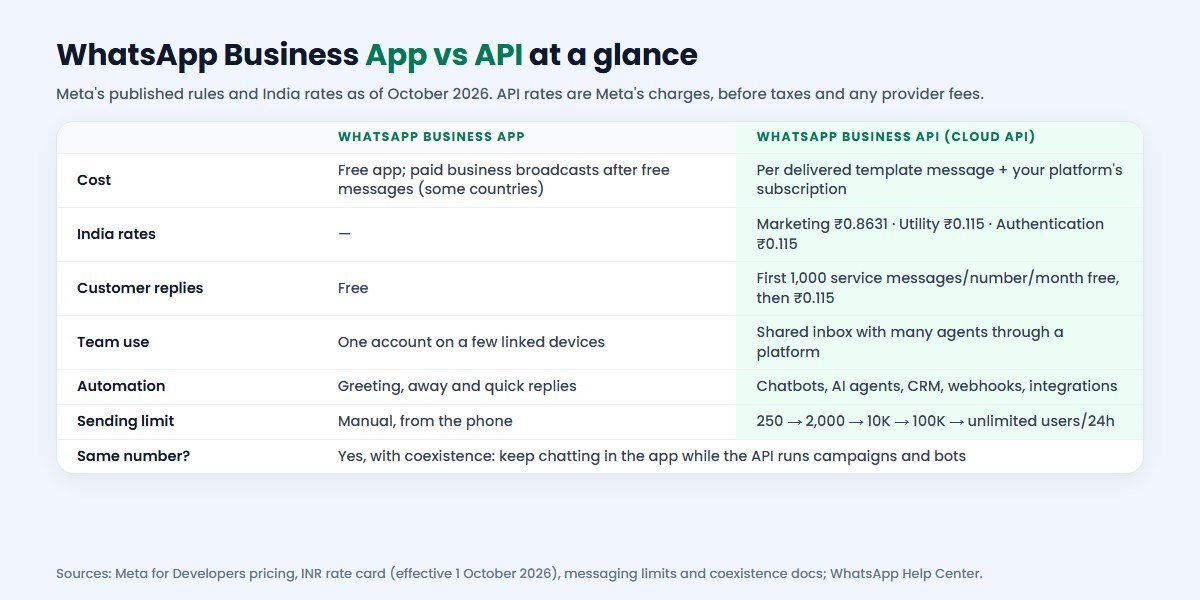
| Feature | WhatsApp Business App | WhatsApp Business API |
|---|---|---|
| Price | Free; paid business broadcasts after free messages where available | Meta charges per delivered template message, plus your platform's fees |
| Who it suits | Owner-run and small businesses | Teams, growing SMEs and enterprises |
| Users | One account on a limited number of linked devices | Many agents in a shared inbox, depending on your platform |
| Automation | Greeting, away and quick replies | Chatbots, flows, AI agents, triggers and drip campaigns |
| Integrations | None official | CRM, e-commerce, ERP, payment and website integrations via API and webhooks |
| Bulk messaging | Business broadcasts in the app (some countries) | Approved templates to opted-in contacts, within your messaging limit |
| Reporting | Basic broadcast insights | Delivery, read, reply, campaign and agent reports through your platform |
| Verification | Optional paid Meta Verified subscription, where available | Meta business verification, which also unlocks higher messaging limits |
| Setup | Minutes, on a phone | Meta Business verification, templates and a platform; usually days |
WhatsApp Business API Pricing in India (2026)
Since 1 July 2025 Meta has charged the WhatsApp Business API per delivered message, not per conversation. What you pay depends on the message category and the recipient's country. Messages customers send to you are free, and you are charged only when your message is delivered.
These are Meta's list rates for messages to Indian numbers, from its INR rate card effective 1 October 2026:
| Category | Used for | Meta rate (India, INR) |
|---|---|---|
| Marketing | Offers, launches, festive campaigns, abandoned-cart nudges | ₹0.8631 per message |
| Utility | Order confirmations, shipping updates, payment reminders, appointment alerts | ₹0.115 per message |
| Authentication | One-time passwords and login codes | ₹0.115 per message |
| Authentication-international | OTPs to Indian numbers from businesses abroad, where it applies | ₹2.4971 per message |
| Service | Your free-form replies within 24 hours of the customer's last message | First 1,000 per number per month free, then ₹0.115 |
Four rules change the real bill, so read them before you budget:
- Service replies are no longer all free. From 1 October 2026 Meta charges service messages beyond the first 1,000 per business phone number each month, and utility messages sent inside an open customer service window are charged too. Earlier guides that say "replies are free" are out of date.
- Click-to-WhatsApp ads open a free window. When someone messages you from a Click-to-WhatsApp ad on the Android or iOS app and you reply in time, Meta opens a free entry point window that may stay open for up to 7 days, during which marketing, utility, authentication and service messages to that person are free.
- Utility and authentication have volume tiers in India, so per-message rates can fall as your monthly volume grows.
- INR billing. Meta began billing eligible India-sold-to businesses in INR from 1 January 2026 and says accounts must move to INR by 31 December 2026, or messages from non-INR accounts stop being delivered from 1 January 2027. Your platform should handle this; ask them.
Meta's rates are before taxes. Your platform or Business Solution Provider adds its subscription, and some add a markup on each message, so always ask for the per-message rate you will actually pay.
What a Month on the API Can Cost: A Worked Example
Take a hypothetical Indian online store in one month: it sends 3,000 marketing messages for a sale, 2,000 utility messages for order and delivery updates, and 2,500 service replies to customer questions from one number. At Meta's October 2026 rates:
- Marketing: 3,000 × ₹0.8631 = ₹2,589.30
- Utility: 2,000 × ₹0.115 = ₹230
- Service: the first 1,000 are free, so 1,500 × ₹0.115 = ₹172.50
- Total Meta charges: ₹2,991.80, before taxes and any provider markup
Add the platform's subscription to that. Notice where the money goes: marketing messages are about 7.5 times the price of utility messages, so the biggest saving usually comes from sending fewer, better-targeted campaigns, not from cutting order updates. Customers who arrive through Click-to-WhatsApp ads can also be messaged inside the free window.
Messaging Limits and Quality
The API does not let a new number message unlimited people on day one. Meta sets a messaging limit: how many unique customers your business can send template messages to, outside open service windows, in a rolling 24 hours. It is set per business portfolio and shared by all your numbers.
- New business portfolios start at 250 unique customers per 24 hours.
- You reach 2,000 through a scaling path: verifying your business, having your partner verify it, or delivering 2,000 messages outside service windows within 30 days using high-quality templates.
- From there Meta scales you automatically to 10,000, 100,000 and then unlimited, based on your volume and quality.
Quality matters as much as volume. If many people block you or report your messages as spam, growth stalls and templates can be paused. Send only to customers who opted in, make every template useful, and give people an easy way to stop.
Coexistence: Keep Your Number on the App and the API
For years, moving to the API meant giving up the app on that number. Meta's coexistence feature changed that. A business already on the WhatsApp Business app can connect the same number to the Cloud API through a Solution Partner or Tech Provider and keep using the app for one-to-one chats.
According to Meta's documentation:
- You need WhatsApp Business app version 2.24.17 or later.
- Contacts and up to the last six months of one-to-one chats can be synced to your platform. Group chats are not synced.
- Messages you send from the app stay free; messages sent through the API are billed at API rates.
- Existing broadcast lists in the app become read-only, and campaigns move to the API.
- Linked companion devices are unlinked when onboarding finishes, and disappearing messages, view-once and live location are turned off in one-to-one chats.
- A number used on both has a fixed throughput of 20 messages per second.
For most small and mid-sized businesses this is the easiest path: the owner keeps chatting from the phone, while the team, broadcasts and chatbot run on the API under the same well-known number.
When the WhatsApp Business App Is Enough
Stay on the free app if most of these are true:
- One or two people answer customers, and they can do it by hand.
- You message dozens of customers a day, not hundreds.
- Customers mostly come to you; you rarely send promotions.
- You do not need chats to reach a CRM, store or billing system.
- A missed message costs little, and you do not need reports on response times.
A local salon, a home tutor, a boutique or a consultant can run happily on the app for years. Use labels, quick replies and the catalogue well and you may never need more.
When You Need the WhatsApp Business API
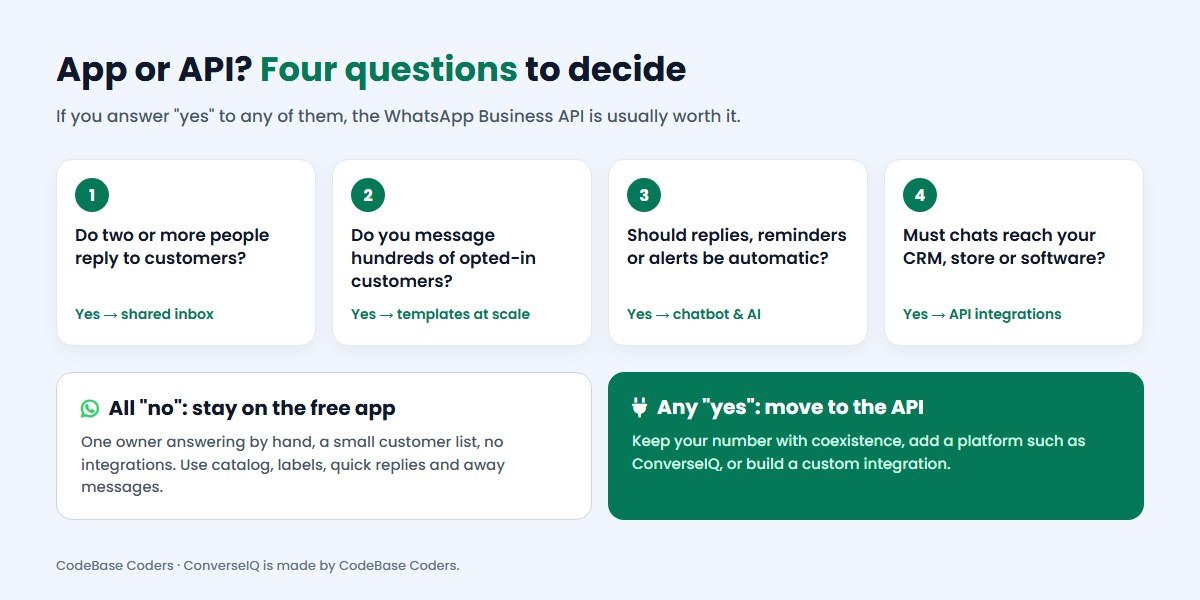
Move to the WhatsApp Business API when any of these apply:
- A team shares the number. Sales, support and operations need their own logins, assigned chats and notes, without passing a phone around.
- You message opted-in customers at scale. Product launches, renewals, fee reminders or festive offers to hundreds or thousands of people.
- Replies should be automatic. A WhatsApp chatbot that answers common questions, qualifies leads or books slots at night and on weekends.
- WhatsApp has to talk to your systems. Leads into your CRM, order updates from Shopify or WooCommerce, payment links, OTPs from your app.
- You need records and reports. Who replied, how fast, which campaign converted, and consent records for each contact.
Typical examples: a real estate developer handling site-visit enquiries from ads, a coaching institute sending fee and class reminders, a D2C brand running cart recovery and order updates, or a clinic confirming appointments.
How to Get the WhatsApp Business API
- Choose how you will use it: a ready-made platform, a direct integration with your own software, or a custom build.
- Set up Meta Business (business portfolio) and verify your business. Verification also unlocks higher messaging limits.
- Connect your number. Use a new number, or keep your current WhatsApp Business app number with coexistence.
- Create message templates for marketing, utility and authentication messages and submit them for Meta's approval.
- Add a payment method for Meta's message charges, in INR if you are an India-billed business.
- Import opted-in contacts, set up your inbox, chatbot and integrations, and train your team.
With a ready-made platform this usually takes a few days, mostly waiting for verification and template approvals. A custom integration takes longer and depends on your systems.
Where ConverseIQ Fits
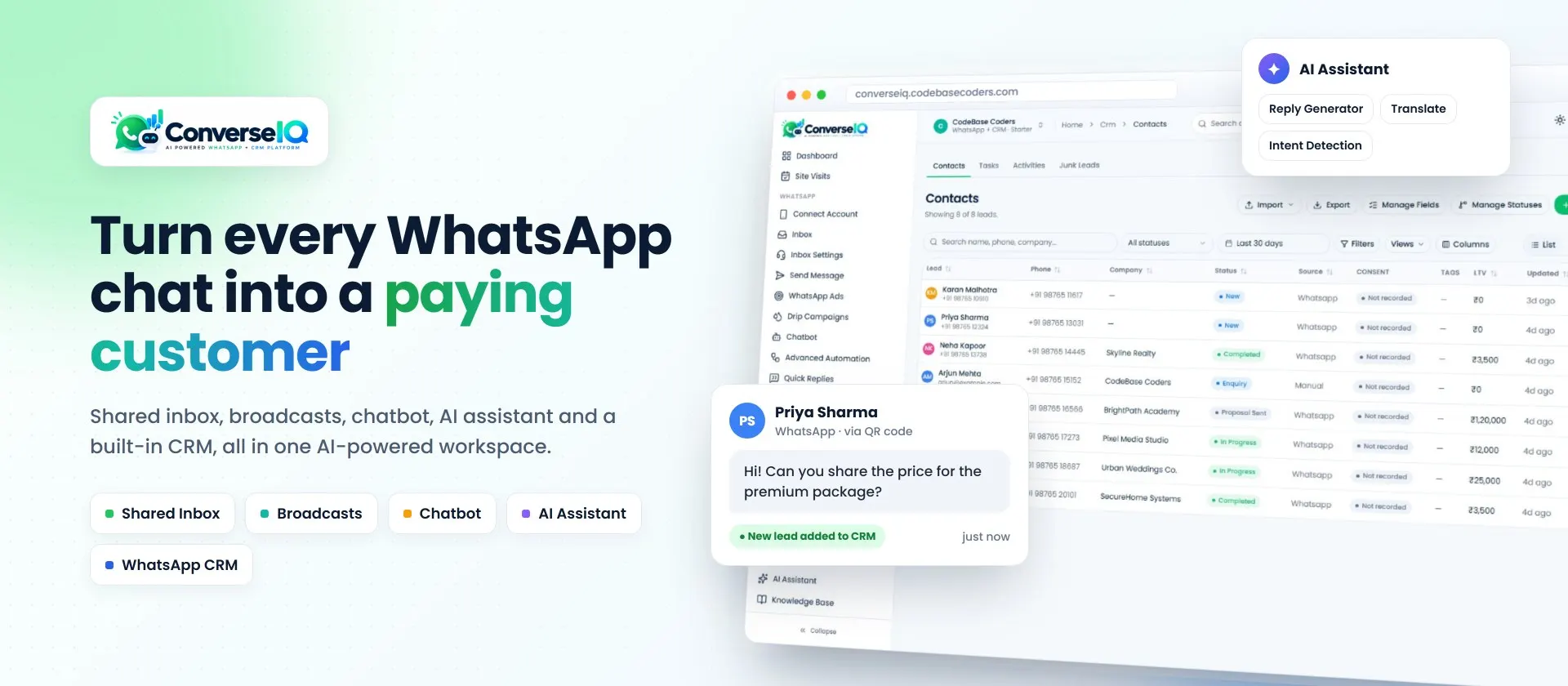
ConverseIQ is the WhatsApp marketing software and CRM built by CodeBase Coders on the WhatsApp Business Platform. It gives a team the API features described above without building them yourself:
- A shared WhatsApp inbox with assignments, filters and quick replies
- Broadcasts and drip campaigns to opted-in contacts using approved templates
- A chatbot flow builder and an AI assistant that works from your own knowledge base
- A built-in WhatsApp CRM where every chat becomes a lead with status, source, consent and tasks
- Website chat widget, QR codes, Click-to-WhatsApp ad tracking, catalogue and orders, and a developer API
WhatsApp plans start at ₹1,200 a month (₹12,000 a year), the CRM at ₹1,200 a month and the WhatsApp + CRM bundle at ₹2,400 a month, with team seats included and a 15-day free trial with no credit card. Meta's message charges are billed separately, as on every platform. If you are comparing providers, our WATI and Interakt comparison sets ConverseIQ against two well-known alternatives.
If your process does not fit any platform, the same team builds custom solutions: WhatsApp AI chatbots, AI agents, API integrations with your CRM, ERP or store, and custom CRMs with WhatsApp built in.
Mistakes to Avoid When You Switch
- Messaging people who never opted in. WhatsApp requires opt-in, and blocks and reports hurt your quality rating and limits.
- Treating every message as marketing. Order updates and reminders belong in utility templates, which cost a fraction of marketing messages. Do not dress promotions up as utility; Meta re-categorises them.
- Budgeting only for the subscription. Meta's per-message charges, now including service replies beyond the free tier, are often the larger number.
- Ignoring the per-message markup. Ask every provider whether it adds anything to Meta's rates.
- Losing chat history. Use coexistence, or export what you need, before you move a number.
- Skipping business verification. Without it you stay on low messaging limits longer.
A Decision Checklist
- How many people need to answer WhatsApp messages?
- How many opted-in customers do you message in a typical month, and for what?
- Which replies could a chatbot or AI agent handle?
- Which systems (CRM, store, billing, app) should WhatsApp connect to?
- What will Meta's charges be for your mix of marketing, utility and service messages?
- Do you want to keep your current number? If yes, plan for coexistence.
- Would a ready-made platform cover you, or do you need custom work?
Not sure what your numbers would look like? Our free AI chatbot cost guide and WhatsApp link generator are good places to start.
Conclusion
The WhatsApp Business App vs API choice comes down to people, volume and connections. The free app is excellent for owner-run businesses that chat by hand. The API is for teams that need a shared inbox, automation, campaigns to opted-in customers and integrations, and it costs money per message: in India from 1 October 2026, ₹0.8631 for marketing and ₹0.115 for utility, authentication and service beyond the free tier. With coexistence you can add the API without giving up your number or your app. Start with the four questions above, price your real message mix, and upgrade when the app is costing you customers.
Frequently Asked Questions
What is the difference between the WhatsApp Business App and the API?
The app is a free phone app for one account, with manual chatting and simple tools. The API (WhatsApp Business Platform) is a paid, programmable service for teams, used through software, with shared inboxes, chatbots, campaigns and integrations.
Is the WhatsApp Business API free?
No. Meta charges per delivered template message by category and country, and from 1 October 2026 for service replies beyond 1,000 per number per month. Platforms also charge their own fees. Messages customers send to you are free.
How much does the WhatsApp Business API cost per message in India?
Meta's INR rate card effective 1 October 2026 lists ₹0.8631 per marketing message and ₹0.115 per utility, authentication and service message to Indian numbers, before taxes and any provider markup.
Can I use the same number on the WhatsApp Business App and the API?
Yes. Meta's coexistence feature lets you connect your existing WhatsApp Business app number to the Cloud API through a provider and keep chatting from the app. Some app features, such as broadcast lists and linked devices, change when you do.
Do I need a developer to use the WhatsApp Business API?
Not if you use a ready-made platform such as ConverseIQ, which handles the connection for you. You need developers for custom integrations, for example with your own CRM, ERP or app.
Which is better for bulk WhatsApp messages?
The API, for regular campaigns to opted-in customers: you get approved templates, delivery and read reports, and limits that grow up to unlimited. The app's business broadcasts suit occasional, small promotions where they are available.
How can CodeBase Coders help me move from the WhatsApp Business App to the API?
We check whether you need the API at all, then set it up end to end: Meta Business verification, your WhatsApp Business Account, coexistence so your team keeps the same number, message templates, and a platform to run it. That can be ConverseIQ, the WhatsApp marketing software and CRM we built, or a custom build from our AI chatbot, integration and custom CRM teams. Book a free consultation.
Sources
- Meta for Developers: Pricing on the WhatsApp Business Platform, incl. INR rate card effective 1 October 2026
- Meta for Developers: Messaging limits
- Meta for Developers: Onboarding WhatsApp Business app users (coexistence)
- WhatsApp Help Center: How to create and send a business broadcast
- WhatsApp Help Center: About multi-agent (linked devices)
- ConverseIQ plans and pricing
Work With CodeBase Coders
CodeBase Coders helps businesses turn ideas into scalable digital products and improve existing processes through software, automation, AI, integrations and modern web technologies. We built ConverseIQ for businesses that sell and support customers on WhatsApp, and we build custom WhatsApp chatbots, CRMs and integrations when a standard platform is not enough.
- ConverseIQ WhatsApp Marketing Software
- AI Chatbot Development (incl. WhatsApp)
- AI Agent Development
- Custom CRM Development
- Software & API Integration Services
- E-commerce Development
Outgrowing the WhatsApp Business app? Book a free consultation or ConverseIQ demo. We will look at your volume and workflow and tell you honestly whether you need the API yet.
Rohan Verma
Founder, CodeBase CodersRohan Verma is the founder of CodeBase Coders. He helps startups, SMEs and enterprises turn ideas into scalable digital products and improve business processes through custom software, AI, automation, integrations and modern web technologies.