Shopify is one of the easiest ways to start selling online, and many Indian brands use it. But many sellers start looking for a Shopify alternative once their store grows. The reason is usually not the monthly plan. It is a fee most people only notice later: because Shopify Payments is not available in India, Indian stores use third-party gateways such as Razorpay, and Shopify charges an extra fee on those sales.
That does not make Shopify a bad choice. For many stores it is still the right one. This guide sets out Shopify's 2026 INR pricing and fees, explains how the transaction fee works, then compares four alternatives: WooCommerce, a custom e-commerce store, marketplaces and selling on WhatsApp. It ends with a checklist so you can decide with real numbers.
At a Glance
- Shopify in India: plans from ₹1,499 a month (Basic, billed yearly) to ₹22,680 (Advanced, billed yearly), with Shopify Plus starting at ₹175,000 a month.
- The fee to know about: Shopify Payments is not offered in India, so sales through Razorpay or another gateway carry a third-party transaction fee of 2% on Basic, 1% on Grow and 0.6% on Advanced, on top of your gateway's own charges.
- WooCommerce is free and open source, with no platform fee on sales, but you pay for hosting, extensions and maintenance.
- A custom store costs more upfront but has no platform fees and fits unusual business models.
- Marketplaces and WhatsApp are channels rather than replacements; many brands use them alongside their own store.
Why Indian Sellers Look for a Shopify Alternative
The most common reasons we hear are:
- Transaction fees on gateway payments, which grow with every rupee you sell.
- App costs. Features such as reviews, upsells, subscriptions or COD controls often need paid apps that add up each month.
- Customisation limits for unusual products, B2B pricing, multi-vendor models or complex checkout rules.
- Data and ownership. Some brands want full control of their code, hosting and customer data.
- Local needs such as GST invoicing, regional languages, specific couriers or deep ERP integration.
Shopify Pricing in India (2026)
From Shopify's India pricing page, as checked on 22 October 2026:
| Plan | Billed monthly | Billed yearly (per month) | Third-party payment fee | Staff accounts |
|---|---|---|---|---|
| Basic | ₹1,994 | ₹1,499 | 2% | Additional staff not included |
| Grow | ₹7,447 | ₹5,599 | 1% | 5 |
| Advanced | ₹30,164 | ₹22,680 | 0.6% | 15 |
| Plus | Starts at ₹175,000 a month | 0.2% | Unlimited | |
Shopify also offers a trial: "Try 3 days free, then ₹20/month for 3 months." Apps, themes and your gateway's charges are extra.
The Hidden Cost: Third-Party Transaction Fees
Shopify's help centre lists the countries where Shopify Payments is available, and India is not one of them. For other countries, it says "you need to use a third-party payment provider." Shopify also states that "third-party transaction fees apply to all transactions processed through third-party and alternate payment gateways."
In practice, an Indian Shopify store that takes payments through Razorpay, PayU, Cashfree or similar pays two charges on each online sale: the gateway's own fee, and Shopify's third-party transaction fee for its plan.
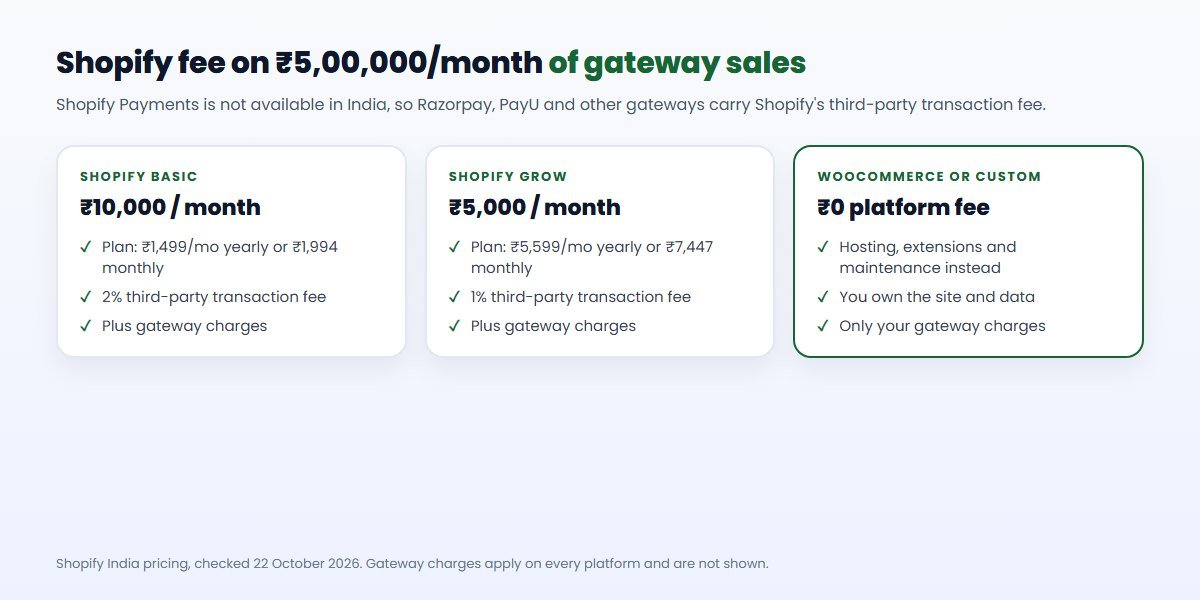
A simple example, using Shopify's published rate: a store on the Basic plan that takes ₹5,00,000 a month in online payments through a third-party gateway pays Shopify 2%, or ₹10,000 a month, in transaction fees, before the gateway's charges. On Grow, the same sales would carry a 1% fee, or ₹5,000. That is why growing stores often move up a plan, or start looking at alternatives.
Cash on delivery orders are not card payments processed by a gateway, so check how your own payment mix applies. For gateway charges themselves, see our guide to UPI and payment charges for merchants.
Shopify Alternative 1: WooCommerce
WooCommerce describes itself as "the free, Open Source ecommerce platform for WordPress" and as "free, with no monthly subscription." There is no platform fee on your sales; you pay only your gateway's charges.
What you do pay for, according to WooCommerce's own pricing page:
- Hosting: WooCommerce estimates $25 to $350 a month for most stores, scaling with traffic. Indian hosting plans vary widely, and a busy store needs good hosting.
- Extensions: $29 to $299 a year per extension, for features such as subscriptions, bookings or advanced shipping.
- Maintenance: WordPress, WooCommerce and plugins need regular updates, backups and security care.
WooCommerce runs on WordPress, so your store and your content site are one system. That makes it strong for SEO-led brands that publish guides, recipes or buying advice next to their products. Indian payment gateways such as Razorpay, PayU and Cashfree offer WooCommerce plugins, and you can add GST invoices, pin-code checks and regional shipping rules with extensions or custom code.
Best for: stores that want full ownership, content-rich sites with a blog, and businesses comfortable with a partner looking after updates. Watch out for: plugin overload, slow hosting and skipped security updates. Our WordPress and WooCommerce developers can help with both.
Shopify vs WooCommerce in India: five practical differences
- Fees on sales. Shopify adds its third-party transaction fee when you use an Indian gateway; WooCommerce adds none, so you pay only the gateway.
- Who looks after the store. Shopify handles hosting, security and updates. With WooCommerce, you or your partner handle them, which is a real ongoing task.
- Speed to launch. A Shopify store with a ready theme can launch faster. WooCommerce needs hosting, setup and more configuration.
- Flexibility. WooCommerce lets you change almost anything in code. Shopify is flexible through themes and apps, within its rules.
- Content and SEO. Both can rank well. WooCommerce sits on WordPress, which many content teams already know; Shopify's blog is simpler.
As a rough rule, the more you sell through gateways and the more you want to customise, the stronger the case for WooCommerce, provided someone will look after it properly.
Shopify Alternative 2: A Custom E-commerce Store
A custom store is built for your business, often with a framework such as Laravel or Node.js and a modern front end. It suits:
- B2B stores with customer-specific prices, credit limits or approvals.
- Marketplaces with multiple sellers, commissions and payouts.
- Configurable products, rentals, subscriptions or bookings.
- Brands that need close integration with an ERP, warehouse or app.
A custom store also lets you design the buying journey around your customers rather than a theme: a quote request instead of a cart for bulk buyers, a product configurator for made-to-order items, or a reorder screen for repeat trade customers. It can share one backend with your mobile app, so the website and app always show the same stock and prices.
You pay more upfront and need a partner to maintain it, but there are no platform fees on sales and no limits on what the store can do. For estimated ranges, see our e-commerce website development cost guide; the figures are labelled estimates, and your quote depends on scope.
Shopify Alternative 3: Marketplaces
Selling on Amazon, Flipkart, Meesho or other marketplaces gives you instant access to buyers without building a store. You pay the marketplace's commission and fees, which vary by category, and you follow their rules on pricing, returns and branding.
Marketplaces are a channel, not a full replacement. You do not own the customer relationship, and it is hard to build a brand there alone. Most growing brands use marketplaces for reach and their own store for margin and repeat customers.
Shopify Alternative 4: Selling on WhatsApp
For many Indian customers, WhatsApp is where shopping conversations already happen: questions about size, stock, delivery and payment. Selling through WhatsApp can mean sharing a catalogue, taking orders in chat and sending payment links, order updates and offers to opted-in customers through the WhatsApp Business API.
ConverseIQ, the WhatsApp marketing platform built by CodeBase Coders, includes stores, products and orders alongside a shared inbox, broadcasts, chatbots, an AI assistant and a CRM. It works alongside a website store or, for some small sellers, as the main sales channel. Meta charges for WhatsApp messages separately; our WhatsApp Business API guide explains how.
Side-by-Side Comparison
| Factor | Shopify | WooCommerce | Custom store | WhatsApp selling |
|---|---|---|---|---|
| Time to launch | Fast | Moderate | Slowest | Fast |
| Monthly platform cost | Plan fee | Hosting and extensions | Hosting and support | Software plan plus Meta message charges |
| Fee on gateway sales in India | 0.2% to 2% by plan | None | None | None from the platform |
| Customisation | Themes and apps | High | Unlimited | Within the platform |
| Maintenance | Shopify | You or your partner | You or your partner | The platform |
| Ownership | Platform-owned | You own the site | You own the code | Platform-owned |
The Full Cost of Running an Online Store
Whichever platform you choose, compare the full monthly and yearly cost, not just the plan price. A realistic budget includes:
- Platform: the Shopify plan, or hosting for WooCommerce and custom stores.
- Platform transaction fees: on Shopify in India, the third-party fee on gateway payments.
- Payment gateway charges: paid to Razorpay, PayU, Cashfree or your chosen gateway on every platform.
- Theme and design: a premium theme, or custom design work.
- Apps and extensions: reviews, subscriptions, upsells, loyalty, shipping rules and invoicing.
- Shipping and logistics: courier charges and any aggregator subscription.
- Marketing: ads, email and WhatsApp messaging.
- Maintenance and support: updates, backups, security and small changes, whether done by your team or a partner.
Put each line into a simple spreadsheet for your current platform and the alternative you are considering, using your real order volume and payment mix. The difference is usually clearer than any feature comparison.
Migrating From Shopify: A Step-by-Step Plan
- Audit what you use. List every Shopify app, theme customisation, integration and automation, and decide what you need in the new store.
- Export your data. Products with variants and images, customers, orders, discount codes and blog content.
- Build and test the new store on a staging site, including checkout with your gateway, shipping rules, taxes and order emails.
- Protect your SEO. Map every old product, collection and page URL to its new address and set up permanent (301) redirects, so search rankings and old links keep working.
- Reconnect integrations: payment gateway, courier, accounting, analytics, ads pixels and WhatsApp.
- Switch over at a quiet time, point your domain to the new store, place test orders and watch closely for the first few days.
- Tell your customers. Existing customers may need to reset their passwords on the new store; a friendly email or WhatsApp message helps.
When Shopify Is Still the Best Choice
An honest guide has to say this: for many stores, Shopify is the right answer. Stay on Shopify, or choose it, if:
- You want to launch quickly with minimal technical work.
- Your sales volume is modest, so the transaction fee is small in rupees.
- Your products and checkout are standard.
- You value a hosted, maintained platform more than full control.
- Your team already knows Shopify and its apps.
If you are growing on Shopify, compare moving up a plan with switching platforms: a higher plan lowers the transaction fee, and that alone may solve the problem. Our Shopify developers help brands customise and scale their stores.
How to Choose: A Decision Checklist
- What are your monthly online sales through gateways, and what would Shopify's fee be on your plan?
- What do you spend each month on Shopify apps?
- Do you need features that Shopify cannot do well without workarounds?
- How important is owning your code and hosting?
- Who will maintain a WooCommerce or custom store?
- How much of your selling already happens on WhatsApp or marketplaces?
- Which ERP, accounting and courier systems must the store connect to?
- What would migration cost, including SEO redirects and data transfer?
Put real numbers next to each answer. If the transaction fee and app costs are small, stay on Shopify. If they are large and growing, or you are fighting the platform, a WooCommerce or custom store is likely to pay off.
Conclusion
The best Shopify alternative for India depends on your sales, your products and who will look after the store. Shopify remains a strong choice for fast, standard stores, but Indian sellers should understand the third-party transaction fee that comes with using Razorpay or other gateways. WooCommerce removes that fee in exchange for more maintenance, a custom store removes every limit at a higher upfront cost, and marketplaces and WhatsApp extend your reach alongside your own store.
Run the checklist with your real numbers. If you want help, we build on Shopify, WooCommerce and custom platforms, and will recommend whatever fits your business best.
Frequently Asked Questions
What is the best Shopify alternative for India?
For most growing stores that want to avoid Shopify's third-party transaction fees, WooCommerce is the most common alternative. For B2B, multi-vendor or highly customised stores, a custom e-commerce site is often better. Many brands also sell through marketplaces and WhatsApp.
Does Shopify charge transaction fees in India?
Shopify Payments is not available in India, so stores use third-party gateways, and Shopify charges a third-party transaction fee on those payments: 2% on Basic, 1% on Grow, 0.6% on Advanced and 0.2% on Plus, according to its India pricing page.
How much does Shopify cost in India?
Basic costs ₹1,994 a month billed monthly or ₹1,499 a month billed yearly; Grow ₹7,447 or ₹5,599; Advanced ₹30,164 or ₹22,680. Shopify Plus starts at ₹175,000 a month.
Is WooCommerce free?
The WooCommerce plugin is free and open source, with no monthly subscription. You pay for hosting, any paid extensions, your payment gateway and maintenance.
Can I move my store from Shopify to WooCommerce?
Yes. Products, customers and orders can be migrated. Plan URL redirects to protect your search rankings, re-create apps and integrations, and test checkout before switching.
How can CodeBase Coders help me choose a Shopify alternative?
CodeBase Coders builds on Shopify, WooCommerce and custom platforms, so we can recommend what fits your catalogue, sales volume and budget rather than one product. We set up and customise Shopify stores, build WooCommerce and custom e-commerce sites, integrate Razorpay, shipping and accounting, and help you sell on WhatsApp with ConverseIQ. Explore our e-commerce development, Shopify developers and WordPress and WooCommerce developers, or book a free consultation.
Sources
- Shopify India pricing (checked 22 October 2026)
- Shopify Help Center: Shopify Payments supported countries
- Shopify Help Center: Third-party payment providers
- WooCommerce pricing
Work With CodeBase Coders
CodeBase Coders helps businesses turn ideas into scalable digital products and improve existing processes through software, automation, AI, integrations and modern web technologies. For e-commerce, we build and customise Shopify stores, WooCommerce sites and custom platforms, integrate payments, shipping and accounting, and help brands sell on WhatsApp.
- E-commerce Development
- Hire Shopify Developers
- Hire WordPress & WooCommerce Developers
- Payment, ERP & API Integration
- ConverseIQ WhatsApp Marketing Software
Weighing Shopify against an alternative? Book a free consultation and we will look at your sales, fees and features and tell you honestly which platform fits.
Rohan Verma
Founder, CodeBase CodersRohan Verma is the founder of CodeBase Coders. He helps startups, SMEs and enterprises turn ideas into scalable digital products and improve business processes through custom software, AI, automation, integrations and modern web technologies.